

Community post
Let's Learn Python - 2 🐍 | Loops
H
i once again !! 👋
Hope you liked the previous article Let's Learn Python 🐍, and it helped give you a mild flavor of what Python is.
In this article we'll go ahead and try to learn loops in Python.

(The worst piece of code I could find on Pixabay! Never forget to properly space, indent and comment your code. It should be legible and readable!)
Starting where we left...
Last time, I left you with a problem: > **Problem:** Can you write Python code to print numbers from 1 - 1000? (Without explicitly stating all the numbers.) > Let's try solving it right away, I'll directly give you the code to ponder upon, later we'll see how it works when we formally describe *loops* and their different types.Let's see if the following piece of code can do our work:
i=1
while(i<=1000):
    print(i)
    i+=1
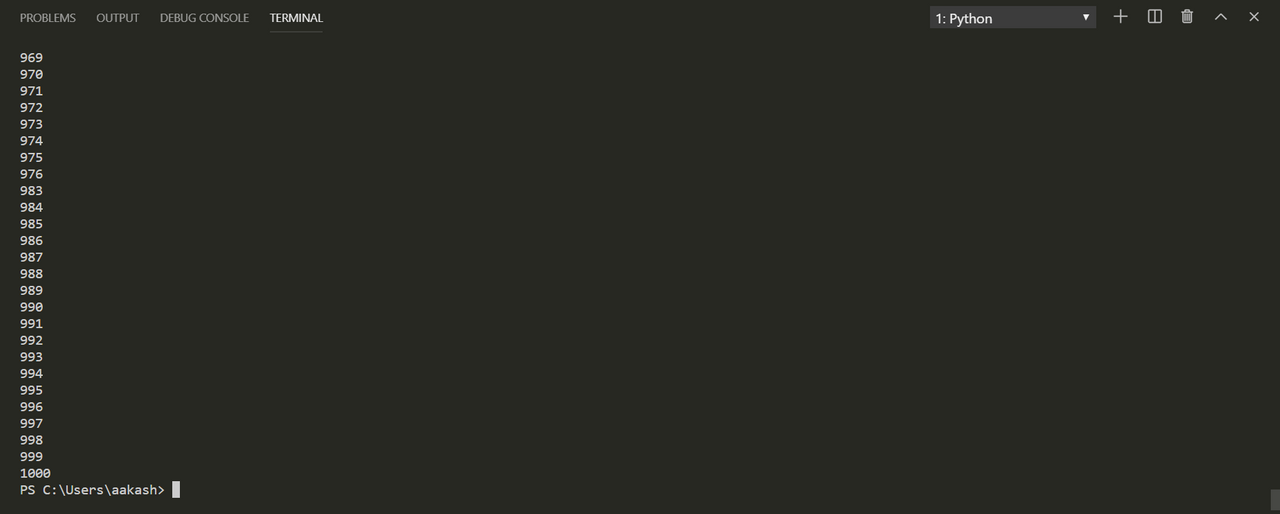
...and there, we got the desired output with just a 4-liner code!
Notice: The
i+=1in the code. This statement contains the compound augmented operator+=we discussed in the previous article.i=1gives i the initial value of 1. Rest is all logical.NOTE: i is often referred to as the sentry variable or more generally a counter.
Okay! Before we move into loops, we'll try to learn a few interesting things:
- Using
range:
Just look at this piece of code for a while, and you should be able to make out what it's doing...
print(*range(0, 10, 1))
print(*range(0, 10, 3))

print(range(0, 10, 1))
print(*range(1, 11, 1))
```python print(*range(1, 1001)) ```
3.2. Loops in Python
Python has 2 basic loops: - **For Loop** --> `for` The syntax for this loop is: ```python for in : <...and this> ``` - **While Loop** --> `while` The syntax for *while loop* looks like this: ```python while : ```
(While Loop Flowchart | **Source:** Wikimedia Commons)
So, let's see a few examples of both of these: - `for`Loop: >**Example - 1)** Let's try to print the numbers from 1-1000 using `for` Loop. >```python >for x in range(1, 1001, 1): > print(x) >``` > >...that was easy! wasn't it?...we got all the numbers printed one below the other. Now, let's try a more useful and challenging program... > >**Example - 2)** Let's write a python program which allows the user to check whether we have a particular fruit in our basket containing apple, mango, guava, avocado, coconut, pineapple...or not. >```python >basket=("apple", "mango", "guava", "avocado", "coconut", "pineapple") >fruit=input("Please pick a fruit to see if it is in your basket. Type it's name to pick.") >for x in basket: > if(x==fruit): > print("CONGRATULATIONS! We have ", fruit, "in our basket") >``` >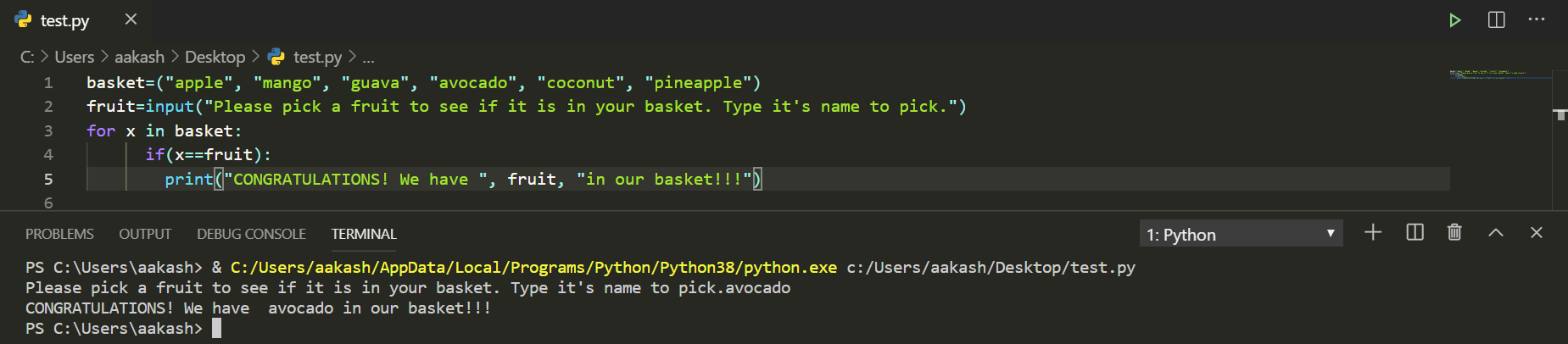 >>**NOTE:** >>1. In the above example we have defined the variable `basket` and have stored a set of strings in it. So, `basket` is technically speaking a ***tuple*** (as of now, you can consider it as a list of objects). >>2. `input()` is a function used to take input from the user. In our case, `input()` takes the name of the fruit from the user (anything specified within this function is printed as a text to direct the user to input the desired things. It acts just like `print()`), and assigns the string entered by the user to the variable `fruit`. >>3. The other thing that is important to notice is the fact that in `if(x==fruit)`, we are using operator `==` instead of `=`. Reason being that using the latter would assign `x` the value contained in `fruit`, while `==` only checks whether the two are equal. > - **`while` Loop:** >Okay, we have already seen a problem which we solved using `while`. Let's try one more: >**Example - 1)** Let's write a program to print the multiplication table of 2. >```python >i=1 >while(i<=10): > print("2 x ", i, "=", 2*i) > i+=1 >``` >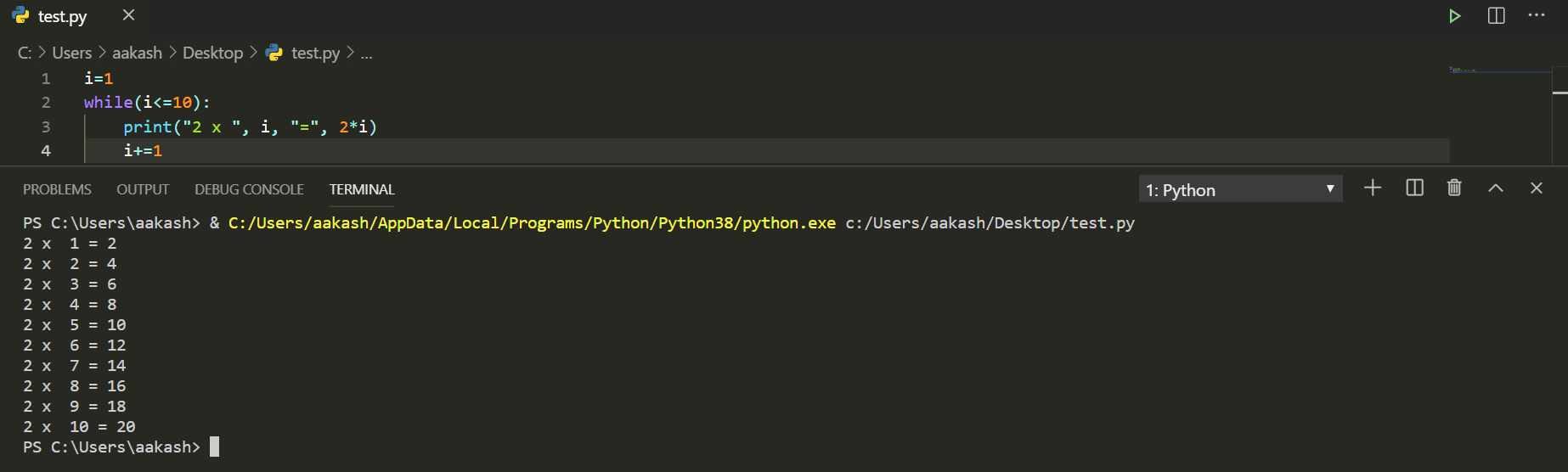 >Well!! That was simple wasn't it? If you are confused, try to read the code line-by-line, and logically think what each line is doing, and how the computer will understand the code. >
Okay, that was simple! But here is an important advice and a note of caution:
NOTE:Indentation is very important in Python. If you wrongly indent the code, then the interpreter will understand it differently.
For example:
if(x==5):
	<do task-A>
	<do task-B>
..means, if x is equal to 5, do tasks A and B.
Whereas,if(x==5): <do task-A> <do task-B>...would mean: if x is equal to 5, do task A. After
ifblock has been implemented, do B (irrespective of the value of x).
Okay, now we somewhat have an idea of basic loops in Python. These loops can be put one-inside the other i.e. they can be nested.
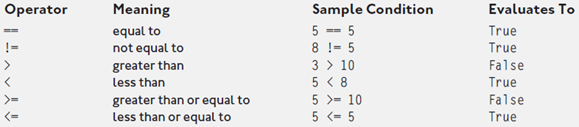
I introduced the operator ==. So, now that we already know one, let's have a look at the others as well:
- Logical Operators in Python:
- Boolean Operators in Python:

I hope that understanding these operators shouldn't be a difficult task, you can also try using them in if, for and while loops.
That's all for today, hope that you are enjoying these short lessons.
NOTE: Unless otherwise stated, all pictures are mine, and have been taken from my own notes, or are my VS Code screenshots.
With this I'll take your leave.
Thanks for sparing your time!
Keep slithering !!
Best,
Aakash
Replies (6)
This post has been voted on by the SteemSTEM curation team and voting trail. It is elligible for support from @minnowbooster.
If you appreciate the work we are doing, then consider supporting our witness @stem.witness!
For additional information please join us on the SteemSTEM discord and to get to know the rest of the community!
Please consider using the steemstem.io app and/or including @steemstem in the list of beneficiaries of this post. This could yield a stronger support from SteemSTEM.
Congratulations @aakashsinghbais! You have completed the following achievement on the Steem blockchain and have been rewarded with new badge(s) :
You can view your badges on your Steem Board and compare to others on the Steem Ranking
If you no longer want to receive notifications, reply to this comment with the word
STOPVote for @Steemitboard as a witness to get one more award and increased upvotes!
Very nice tutorial! Thanks for sharing!
Great guide thanks. BTW you missed some semicolons at the end of your for statement, it throws these errors: "SyntaxError: invalid syntax."
Thanks! Haha!
They are a programmer's worst enemies!!😄
I have made the corrections.
Best,
Aakash
Thank you!
Nice to hear that you liked the article.😊