

Community post
How to add validation in ruby on rails (#part3)
What Will I Learn?
- You will learn how to add validation in Ruby on Rails Project such as in forms, models and in database.
- You will learn how to migrate and rollback your migrations in ruby on rails project
- You will learn some basic MySQL command
Requirements
- OS: Ubuntu/Mac OS
- A text editor like sublime
- Basic understanding about Ruby on Rails
- And for better understanding must refer my previous tutorials (link added to the curriculum)
Difficulty
- Intermediate
Tutorial Contents
Hello and welcome to the next part of the tutorial. In this tutorial, we will learn how to add validations in our project.
But before that one question may arise that why we use validations?
The answer is that to ensure that only valid and right data should be saved into the database.
We can add severals levels of validations in our project. We will go through every aspect of validation in this tutorial, so let's start the tutorial.
- Firstly go to the rails app and start the server in the terminal, that was build in my previous tutorials
- And also the open project in a text editor (Sublime text)
- Enter the following URL in the browser
localhost:3000/users/sign_up
-
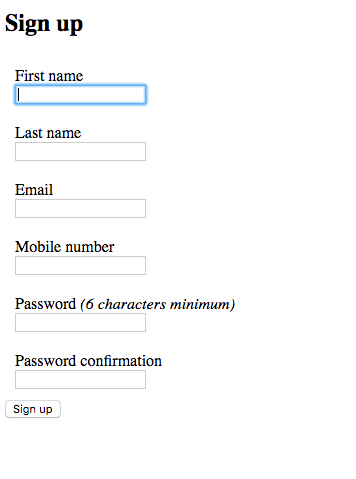
You will see the sign-up form as seen below
-
When you fill up the form details except for user first and last name, the app does not give you an error and it will save the user normally, see below

You can see that new user is created but without its name, because we did not add any validations for that
So let's start adding the validations,
Firstly we will add validation in models so that required field's can not be saved blank, for that
- go to app > models > user.rb and save the following code
validates_presence_of :first_name, :last_name
If you want to validate many fields in one line that you can use this type of format
	validates :first_name, presence: { message: "is required." }
	validates :last_name, presence: { message: "is required." }
If you want to validate individual fields with the custom message that you can use this type of format
- And if the user tried to submit the form, the app will show error like this

Model-level validation is very important because the user can bypass the front end validations
-
Now we will add validation in forms so that required field's can not be submit it blank, for that
-
Just add required: true in the input type fields.

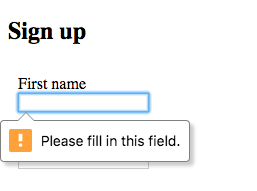
- And now if the user submits the form with a blank username then the following error will be shown
- And lastly we will add validation at database
- Database validations are required when someone tried to alter the database directly
- You see if the form is submitted without email, it gives the error because devise by default add some database level validations
- But we added the username field later and it is already migrated so for that we have to rollback our database
- Stop the server and run the following command
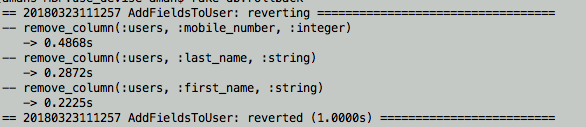
rake db:rollback
- It shows the info as shown below
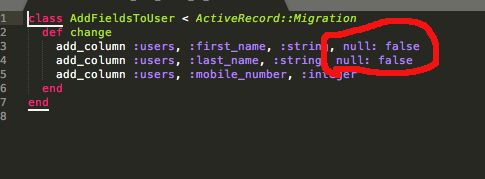
- Now go to your app > db > migrate > your add fields to user migrate name file and change the code as below and save it
class AddFieldsToUser < ActiveRecord::Migration
  def change
  	add_column :users, :first_name, :string, null: false
  	add_column :users, :last_name, :string, null: false
  	add_column :users, :mobile_number, :integer
  end
end
-
Or you can refer image below
-
Now run the following command to migarte our database
rake db:migrate
- It will migrate the database
- And now if someone tried to save the username blank directly from the database, it won't be able to do that
- So let's have a try on it, open the terminal and go to your project path and enter into MySQL console
mysql -u root -p
show database;
It will show all your MySQL database on your system
- Now select your database
use "your database name" ;
- Now try to change the username in the user table
Update users set first_name = null;
- You will see the error like as shown in below image

So that's all for this tutorial. we successfully validate our app and no one can bypass it without filling the necessary fields
Curriculum
- https://utopian.io/utopian-io/@amn/how-to-authenticate-user-in-rails-using-devise-part1
- https://utopian.io/utopian-io/@amn/how-to-authenticate-user-in-rails-using-devise-part2
Posted on Utopian.io - Rewarding Open Source Contributors
Replies (4)
Thank you for your contribution, yet it cannot be approved because it does not follow the Utopian Rules.
Please keep these notes in mind when writing your next tutorials.
You can contact us on Discord.
[utopian-moderator]
Thanks for reviewing this post. As per your suggestion I updated the content. Please review it once again
Hey @mcfarhat, I just gave you a tip for your hard work on moderation. Upvote this comment to support the utopian moderators and increase your future rewards!
Congratulations! This post has been upvoted from the communal account, @minnowsupport, by amn from the Minnow Support Project. It's a witness project run by aggroed, ausbitbank, teamsteem, theprophet0, someguy123, neoxian, followbtcnews, and netuoso. The goal is to help Steemit grow by supporting Minnows. Please find us at the Peace, Abundance, and Liberty Network (PALnet) Discord Channel. It's a completely public and open space to all members of the Steemit community who voluntarily choose to be there.
If you would like to delegate to the Minnow Support Project you can do so by clicking on the following links: 50SP, 100SP, 250SP, 500SP, 1000SP, 5000SP.
Be sure to leave at least 50SP undelegated on your account.