

Community post
Cheap BadUSB Device
USB RUBBER DUCKY CLONE TUTORIAL

CJMCU-32 virtual keyboard for arduino leonardo ATMEGA32U4
how to setup step by step
1.)

download and install
https://www.arduino.cc/en/Main/Software
2.)
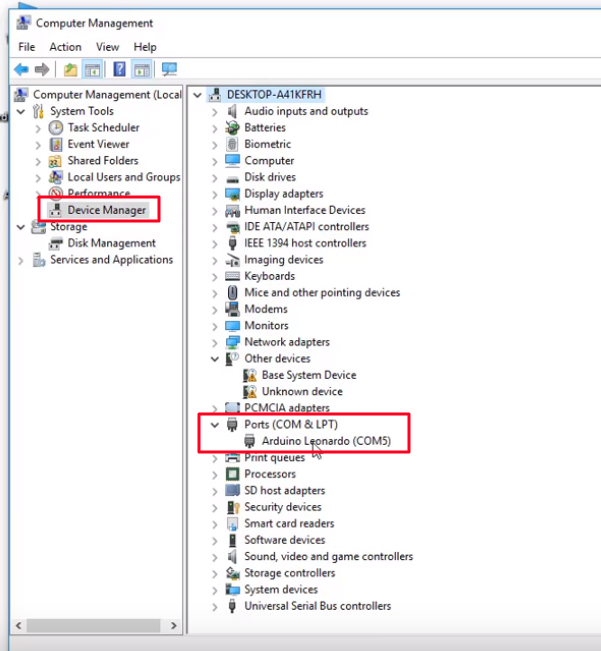
open device manager and check port
my is ( COM5)
3.)

start adruino software and select your COM port
4.)

select Board
5.)
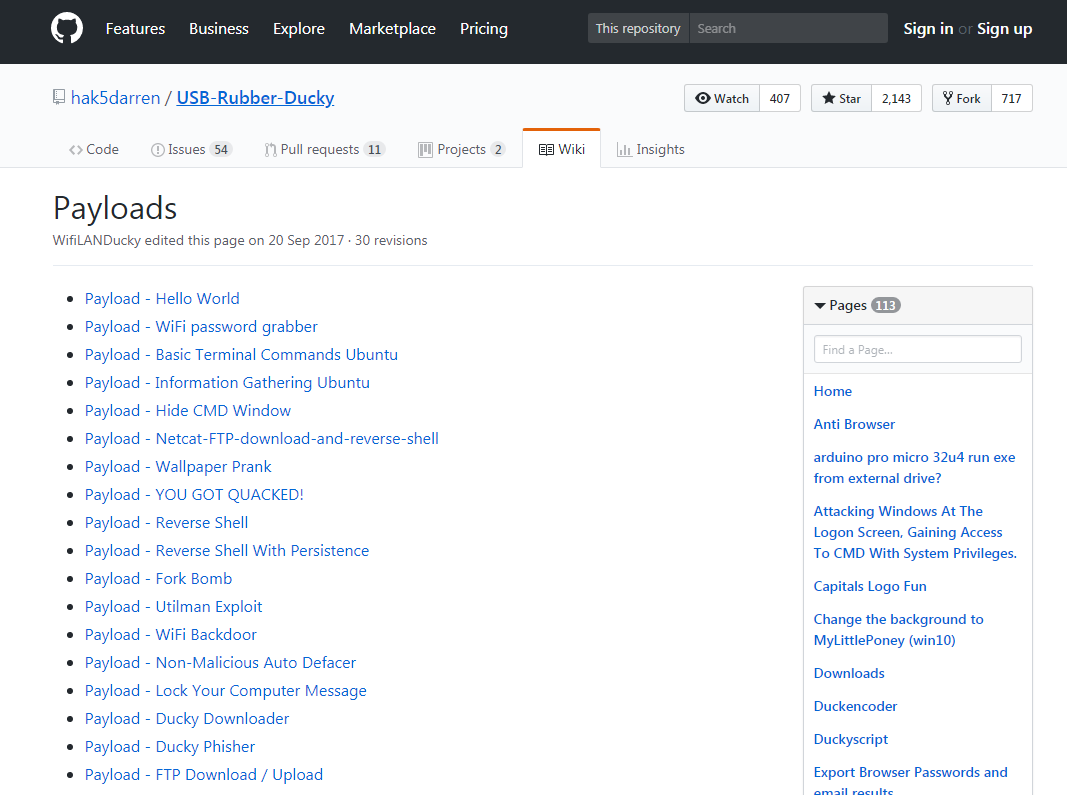
now open your browser and select a duckyscript from https://github.com/hak5darren/USB-Rubber-Ducky/wiki/Payloads or write your own duckyscript.
6.)

i copy this script
7.)

now go to https://roothaxor.gitlab.io/ducky2arduino_stable/ and paste the duckyscript in the inputbox and press Compile button. After compile copy the arduino-code from outputbox.
8.)
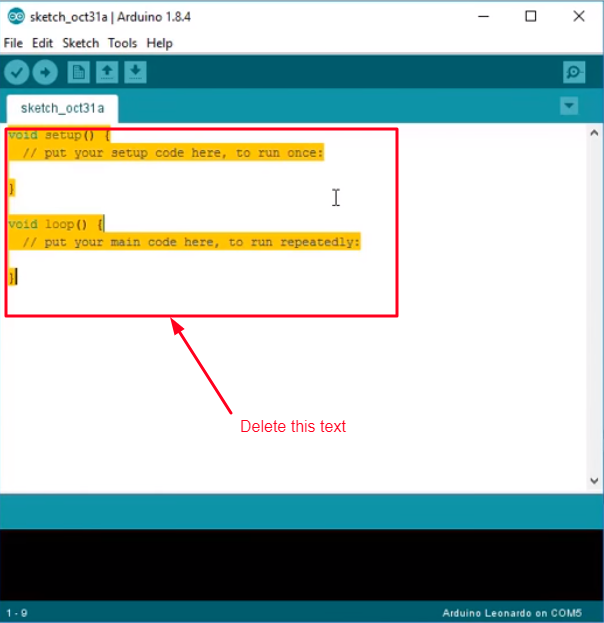
change to arduino software and paste the arduino-code in the box
9.)

- press verify button to see if there are any errors
- press to upload the code on your stick.
keyboard layout is standard English to change language use
for arduino-code this:
Keyboard.press(KEY_LEFT_ALT);
Keyboard.press(KEY_LEFT_SHIFT);
Keyboard.releaseAll();
or for duckyscript this:
ALT SHIFT
9.) STAY EVIL AND HAVE FUN
May the Force be with you!!
Replies (7)
Congratulations @anonymu! You have completed some achievement on Steemit and have been rewarded with new badge(s) :
Click on any badge to view your own Board of Honor on SteemitBoard.
For more information about SteemitBoard, click here
If you no longer want to receive notifications, reply to this comment with the word
STOPCongratulations @anonymu! You have completed some achievement on Steemit and have been rewarded with new badge(s) :
Click on any badge to view your own Board of Honor on SteemitBoard.
For more information about SteemitBoard, click here
If you no longer want to receive notifications, reply to this comment with the word
STOPCongratulations @anonymu! You have completed some achievement on Steemit and have been rewarded with new badge(s) :
Click on any badge to view your own Board of Honor on SteemitBoard.
For more information about SteemitBoard, click here
If you no longer want to receive notifications, reply to this comment with the word
STOPDo not miss the last announcement from @steemitboard!
Congratulations @anonymu! You have completed the following achievement on Steemit and have been rewarded with new badge(s) :
Click on the badge to view your Board of Honor.
If you no longer want to receive notifications, reply to this comment with the word
STOPDo not miss the last post from @steemitboard:
SteemitBoard and the Veterans on Steemit - The First Community Badge.
Congratulations @anonymu! You have completed the following achievement on the Steem blockchain and have been rewarded with new badge(s) :
Click here to view your Board of Honor
If you no longer want to receive notifications, reply to this comment with the word
STOPCongratulations @anonymu! You received a personal award!
Click here to view your Board
Congratulations @anonymu! You received a personal award!
You can view your badges on your Steem Board and compare to others on the Steem Ranking
Vote for @Steemitboard as a witness to get one more award and increased upvotes!