

Community post
Create New Mail Profile (Outlook)
Outlook sometimes has issues where the user profile gets corrupted or can't open along with other issues.
A good troubleshooting step is to build a new profile. This will create a new profile, but you can still maintain the old profile in case any data is not synced over and needs to be retrieved.
Once the new profile is created emails are usually re synced within a few minutes.
Here is a quick video on the steps to create a new profile. Text instructions and photos are below.
Steps to create a new profile are:
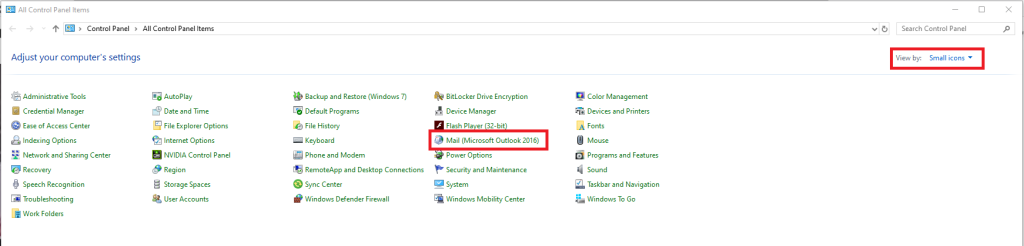
- Open control panel
- Change Control Panel View to small or large icons if not already set to this.
- Click on "Mail"
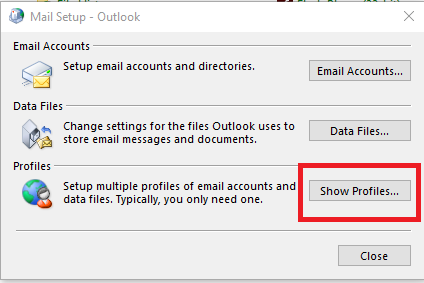
- Click "Show Profiles..." on the new screen
- Click "add"
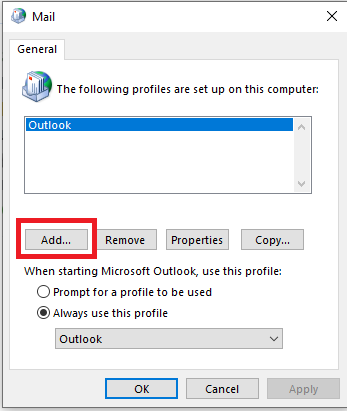
- Name the profile whatever you want (this is just for your own reference),click OK
- Input your email information to complete the profile.
- Select the new profile under "always use this profile" drop down
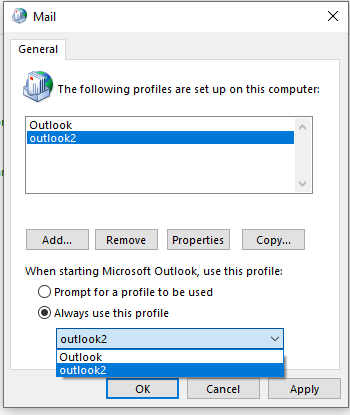
- Click apply, then open outlook again.
- Emails may take a few minutes to start appearing. If you need to switch back to your old profile you can go back to the "always use this profile" drop down and change it to the original profile.
Replies (1)
Congratulations @antifx! You received a personal award!
You can view your badges on your Steem Board and compare to others on the Steem Ranking
Vote for @Steemitboard as a witness to get one more award and increased upvotes!