

Community post
Drawing with The paintComponent Method on the Java Panel(JPanel) Using Eclipse IDE
What Will I Learn?
In this tutorial;
- You will learn how to draw something on a JPanel.
- You will learn the use of the paintComponent method.
- You will learn to use of super.paintComponent decleration.
- You will learn the drawing methods.
Requirements
- Java SE Development Kit (Not necessarily the last version) is required.
- Eclipse IDE or any similar Interated Development Enviroment (IDE) that is designed for Java programming language is required.
Difficulty
- Basic
Tutorial Contents
The purpose of this tutorial is to explain how to draw a Graphics object on the JPanel. To explain, a demo program which displays a basic face drawing in JFrame is desingned. For this demo program, we have 2 different Java file.
- For the main frame of the program (Drawing_Face_Demo.java);

- For the panel that contains face drawings (Face_Drawing_Panel.java);

Defining The Panel
A separate panel class for the drawing face panel needs to be defined. The constants of the of the panel is also needed to be declared before writing the costructor of the class. We have two constant in this program. These are for the base points of the face that is drawn.
import javax.swing.JPanel;
import java.awt.*;
public class Face_Drawing_Panel extends JPanel {
	public int base_point_x=130;
	public int base_point_y=110;
To set up the characteristic of the panel, we need to desing the constructor of the panel. In here, we can only draw the background color as drawing because the other drawings should not be in the constructor of the class.
	public Face_Drawing_Panel() {
		setBackground(Color.BLACK);
		setPreferredSize(new Dimension (350,350));
		setFont(new Font("Times New Roman", Font.ITALIC, 30));
	}
Drawing The Face
The paintComponent Method
If it is needed to draw something on JPanel other than drawing the background color, the definition of paintComponent method should be added. This method is already exist in jPanel class so that we need to use super decleration to add something to this method and takes Graphics objects as parameters. Note that the super.paintComponent which represents the normal the paintComponent method of the JPanel which can only handle the background of the panel must be called in the first line. It is always used in the first line in the paintComponent method. Then, we can add our drawing into the the paintComponent method.
	public void paintComponent(Graphics page) {
		super.paintComponent(page);
Now we can add our drawings. The method that we are going to use are similar to the method that we used in Drawing in JApplet Example. You can find the explanation of fillOval, drawOval and drawArc methods there. In this program,
-
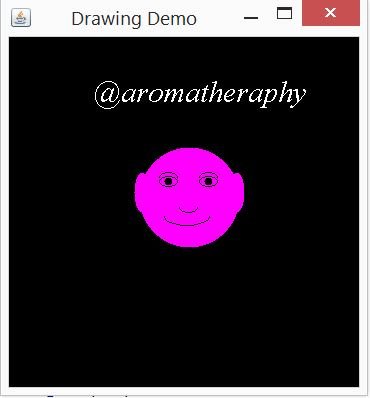
For head in magneta color the following code is added;
page.setColor(Color.MAGENTA); page.fillOval(base_point_x, base_point_y, 100, 100);//For HEAD -
For the ears the following code is added;
page.fillOval(base_point_x-5, base_point_y+25, 15, 40);//Left EAR page.fillOval(base_point_x+90, base_point_y+25, 15, 40);//Right EAR -
For the black eyes the following code is added;
page.setColor(Color.black); page.drawOval(base_point_x+20, base_point_y+29, 18, 10); //Left EYE page.drawOval(base_point_x+60, base_point_y+29, 18, 10); //Right EYE -
For the pupils the following code is added;
page.fillOval(base_point_x+25, base_point_y+30, 8, 8); //Left PUPIL page.fillOval(base_point_x+65, base_point_y+30, 8, 8); //Right PUPIL -
For the eyebrows the following code is added;
page.drawArc(base_point_x+20, base_point_y+25, 18, 10, 0, 180); //Left Eyebrow page.drawArc(base_point_x+60, base_point_y+25, 18, 10, 0, 180); //Left Eyebrow -
For the nose the following code is added;
page.drawArc(base_point_x+40, base_point_y+55, 18, 10, 180, 180); //NOSE -
For the mouth the following code is added;
page.drawArc(base_point_x+25, base_point_y+60, 45, 18, 180, 180); //MOUTH -
For drawing words we used the drawString method that takes the String that needs to be drawn and its position as parameters.
  	page.setColor(Color.white);
  	page.drawString("@aromatheraphy", base_point_x-45, base_point_y-45);
Main Frame
In the main frame, you need create the frame of the program;
		JFrame frame = new JFrame("Drawing Demo");
		frame.setDefaultCloseOperation(JFrame.EXIT_ON_CLOSE);
Then, you need to create the Face_Drawing_Panel object;
Face_Drawing_Panel panel = new Face_Drawing_Panel();
Finally, by adding this panel to the main frame, the program will be ready.
		frame.getContentPane().add(panel);
		frame.pack();
		frame.setVisible(true);
Results
When the program runs, the following frame with the face panel opens as expected.

Code of The Program
//Face_Drawing_Panel.java
import javax.swing.JPanel;
import java.awt.*;
public class Face_Drawing_Panel extends JPanel {
	public int base_point_x=130;
	public int base_point_y=110;
	public Face_Drawing_Panel() {
		setBackground(Color.BLACK);
		setPreferredSize(new Dimension (350,350));
		setFont(new Font("Times New Roman", Font.ITALIC, 30));
	}
	public void paintComponent(Graphics page) {
		super.paintComponent(page);
		page.setColor(Color.MAGENTA);
		page.fillOval(base_point_x, base_point_y, 100, 100);//For HEAD
		page.fillOval(base_point_x-5, base_point_y+25, 15, 40);//Left EAR
		page.fillOval(base_point_x+90, base_point_y+25, 15, 40);//Right EAR
		page.setColor(Color.black);
		page.drawOval(base_point_x+20, base_point_y+29, 18, 10); //Left EYE
		page.drawOval(base_point_x+60, base_point_y+29, 18, 10); //Right EYE
		page.fillOval(base_point_x+25, base_point_y+30, 8, 8); //Left PUPIL
		page.fillOval(base_point_x+65, base_point_y+30, 8, 8); //Right PUPIL
		page.drawArc(base_point_x+20, base_point_y+25, 18, 10, 0, 180); //Left Eyebrow
		page.drawArc(base_point_x+60, base_point_y+25, 18, 10, 0, 180); //Left Eyebrow
		page.drawArc(base_point_x+40, base_point_y+55, 18, 10, 180, 180); //NOSE
		page.drawArc(base_point_x+25, base_point_y+60, 45, 18, 180, 180); //MOUTH
		page.setColor(Color.white);
		page.drawString("@aromatheraphy", base_point_x-45, base_point_y-45);
	}
}
//Drawing_Face_Demo.java
import javax.swing.JFrame;
public class Drawing_Face_Demo {
	public static void main(String[] args) {
		JFrame frame = new JFrame("Drawing Demo");
		frame.setDefaultCloseOperation(JFrame.EXIT_ON_CLOSE);
		Face_Drawing_Panel panel = new Face_Drawing_Panel();
		frame.getContentPane().add(panel);
		frame.pack();
		frame.setVisible(true);
	}
}
Github
You can get this program here.
Curriculum
You can find my other java related tutorials in below links.
- Adding JPEG or GIF image files into the GUI in Java using Eclipse IDE
- Reading Text Files and Parsing It Using Iterators and Delimiter in Java with Eclipse IDE
- Drawing Methods in Java Applet (JApplet) Using Eclipse IDE: Drawing a Snowman
- Check Boxes (JCheckBox) and Its Listeners in a Java GUI using Eclipse IDE
- Use of Layout Managers and Tabbed Pane in Java Using Eclipse IDE
- Use of Borders in a Java GUI Using Eclipse IDE
- The Use of File Choosers in Java Using Eclipse IDE
- The Use of The Color Chooser (JColorChooser) and do - while Statement in Java Using Eclipse IDE
- The Use of Split Panes and the ListSelectionListener Interface in Java Using Eclipse IDE
- The Use of Slides and the ChangeListener Interface in Java Using Eclipse IDE
Posted on Utopian.io - Rewarding Open Source Contributors
Replies (3)
Thank you for the contribution. It has been approved.
You can contact us on Discord.
[utopian-moderator]
Hey @kizilelma, I just gave you a tip for your hard work on moderation. Upvote this comment to support the utopian moderators and increase your future rewards!
Hey @aromatheraphy I am @utopian-io. I have just upvoted you!
Achievements
Suggestions
Get Noticed!
Community-Driven Witness!
I am the first and only Steem Community-Driven Witness. Participate on Discord. Lets GROW TOGETHER!
Up-vote this comment to grow my power and help Open Source contributions like this one. Want to chat? Join me on Discord https://discord.gg/Pc8HG9x