

Community post
Add Steemit logo to bootstrap-social
I have added the Steemit logo to the social media button library bootstrap-social.
Bootstrap-social is based on the web development toolkit bootstrap and the font library Font-Awesome and makes it possible to add nice buttons for social media links.
After I added Steemit logo to Font-Awesome (also on utopian.io, currently in review) I could also add Steemit social media buttons to bootstrap-social.
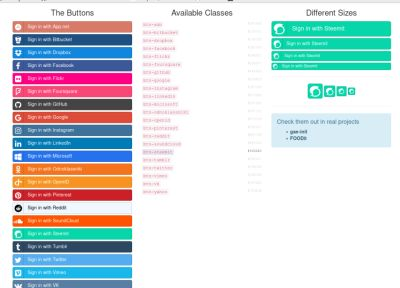
Here is an example on how it can be used:

I use it on my about page on my web site. If you clone the repository you can open index.html for more examples like this:
My fork can be found here
How to use it on a website
Clone my forked version of bootstrap-social
$ git clone https://github.com/bhjortsberg/bootstrap-social.git
It contains font files from Font-Awesome in assets/fonts (which are copies from my forked version of Font-Awesome) and the Font-Awesome css file in assets/css.
Copy assets/css/font-awesome.css and the assets/font directory to the root of your web site.
Then on your web page you add in <head> section:
<link href="/font-awesome.css" rel="stylesheet">
<link href="/bootstrap-social.css" rel="stylesheet">
and in the <body> section where you want your Steemit button:
    <a class="btn btn-social-icon btn-steemit">
        <span class="fa fa-steemit"></span>
    </a>
Enjoy your new Steemit button!
Posted on Utopian.io - Rewarding Open Source Contributors
Replies (4)
Your contribution cannot be approved yet, because it is in the wrong category. The correct category for your post is
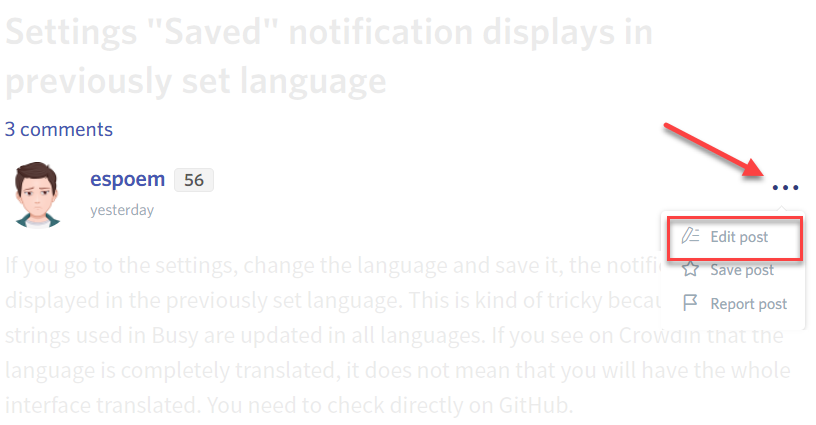
suggestion. See the Utopian Rules. Please edit your post to use the right category at this link, as shown below:You can contact us on Discord.
[utopian-moderator]
Aha, thanks i'll change that.
Hi there. I would like to use your icon in the framework that I am working on (Odoo). However, I can't really force users to update their bootstrap / font-awesome to some custom stuff.
Could you provide jpg/png or gif? Can I use your icon that way? (You would be listed as icon author and there would be a link to your page in app description)
Thanks:)
Congratulations @bhj! You received a personal award!
You can view your badges on your Steem Board and compare to others on the Steem Ranking
Vote for @Steemitboard as a witness to get one more award and increased upvotes!