

Community post
MetaMask: Blockchain Interaction in your Browser
By: Mason Vollum @crypto-mason
4 Minute Read

When first deciding you want to foray into the cryptocurrency and blockchain world it’s difficult to know where to begin. The talk of huge growth recently has probably peaked your interest, but seeing discussion of public and private keys, block times, and other related components of the crypto world may have made your eyes glaze over. Fear not because there are simpler solutions and implementations coming about in the near future that will make this world more easy and understandable. For now, however, we have tools like MetaMask to simplify our lives a little bit.
What is the Ethereum Blockchain
First things first the Ethereum blockchain is a big list of every transaction that’s ever happened its’ ecosystem. This can be transactions in Ether as well as transactions in [ERC20](https://www.investopedia.com/news/what-erc20-and-what-does-it-mean-ethereum/) tokens, a standard that has been created and allows developers to follow a list of defined rules for deploying their own currency. On top of that Ethereum let’s users and developers create and interact with smart contracts, which can be thought of like a vending machine. You know that if you walk up to a vending machine, put in money, and select your soda you (should) have that soda delivered to you by the machine. Much in this way smart contracts can allow you to exchange one thing for another, lock money into escrow for set periods of time, along with a host of other functionality being fleshed out every day.Interacting with a Smart Contract
When you have an Ethereum wallet you can use any Ether loaded into it in order to interact with smart contracts. If you use a wallet gateway such as [My Ether Wallet](https://www.myetherwallet.com/) interaction with these contracts will be done on that site by pasting an addresses in the ‘Contract Address’ field, pasting some JSON data into the next field, and clicking access. Don’t worry if you don’t understand, that part doesn’t need to make sense to you, it’s difficult and makes interaction clunky and complicated. Enter MetaMask, a browser extension that will live in the upper right corner of your browser window and is represented by a fox. 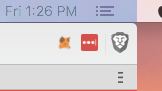Getting Started
Firstly I recommend downloading and using [Brave](https://brave.com/) browser which I highly recommend and go into more detail on [here](https://steemit.com/security/@crypto-mason/browse-better-using-brave-to-save-you-time-money-and-headache). This guide will be for setup with Brave but the process is similar for Chrome users. 1. Click “Brave” in the upper left corner of your browser and then select preferences. 2. On the left side of the resulting window click extensions -Here you will see a whole host of plugins you can use with Brave. I go into more detail on Lastpass in the previously mentioned article above. 3. Find MetaMask on the list and at the right side of the screen click the little slider to turn it on. 4. In the upper right corner click the little fox logo. Try to ignore the cuteness of the big fox head that pops up and watches your mouse, it’s time to make a password. -WHEN MAKING A PASSWORD USE SOMETHING YOU’VE NEVER USED BEFORE. ONLY RECORD IT ON PAPER. MAKE IT DIFFICULT. -I suggest using mnemonic devices for your password which I talk about briefly in the above linked article. 5. Once logged in clicking the fox will bring up your wallet details, here is mine: 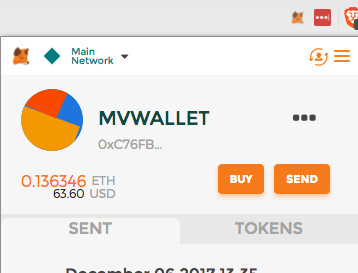 6. Clicking the three dots above send will open a pop up menu with options to: -View account on Etherscan -Show QR Code -Copy Address to clipboard -Export Private KeyThe Upsides of MetaMask
Wallets like MyEtherWallet and others don’t allow for the ease of interaction that MetaMask does. MetaMask’s home in a browser plugin means that you can interact with a contract as quickly as you are able to find it. MetaMask will empower you to explore and use the various DApps being developed on the ethereum network. These DApps include provably scarce trading games like [CryptoKitties](https://www.cryptokitties.co/), decentralized trading platforms such as [EtherDelta](https://etherdelta.com/), decentralized and provably fair gambling such as [Etheroll](https://etheroll.com/) (active) and [Funfair](https://showcase.funfair.io/) (near release), and more everyday.From Here
I will be writing about some of the various DApps available and providing some overview and analysis of each. Some DApps also provide investment opportunities through their own token and I will try to cover some of the opportunities as I see fit.
LTC: 3AbTbTw7c7go2NkcmTPXeiy91M4aoYDJVH
ETH: 0x8a134b8C8f1e5FD17B3f2131abAfE9d0644d8ec8
BTC: 3P92sr4PTGNweGLjAN7vRX9gXjNMbUjqrb
My Work:
[About Me](https://steemit.com/introduceyourself/@crypto-mason/ekyvf-intro-to-crypto-mason-a-quick-hello-from-the-windy-city)Blockonomics:
Episode 1: How to be a Speculator
Episode 2: Real World Value in a Virtual Environment
Getting Started:
Browse Better: Using Brave to Save you Time, Money, and Headache
MetaMask: Blockchain Interaction in your Browser
Replies (2)
Congratulations @crypto-mason! You have received a personal award!
Click on the badge to view your Board of Honor.
Do not miss the last post from @steemitboard:
SteemitBoard World Cup Contest - France vs Belgium
Participate in the SteemitBoard World Cup Contest!
Collect World Cup badges and win free SBD
Support the Gold Sponsors of the contest: @good-karma and @lukestokes
Congratulations @crypto-mason! You received a personal award!
You can view your badges on your Steem Board and compare to others on the Steem Ranking
Vote for @Steemitboard as a witness to get one more award and increased upvotes!