

Community post
Flask Implementation with SQL Alchemy & PostgreSQL

Image Source
If you want to create a lightweight and fast web app, Flask is the best solution. Flask is written in Python and one of the most widely used Python web frameworks for start-ups, and is becoming commonly accepted as the perfect tool for quick and simple solutions in most businesses. At its core, it provides a set of powerful libraries.
What Will I Learn?
- Combine python with Flask
- Implement Login Flask-SQLAlchemy with PostgreSQL
Requirements
- Install Python3.6
- Install pip
- Install virtualenv
- Install Flask
- Install PostgreSQL
- Install Flask SQLALchemy
- Browser(Chrome, IE, FireFox)
Difficulty
- Basic
Tutorial Contents
Flask is written in Python so we have to install python. Instructions for installing Python can be found here.
If we want to know python version installed just type:
python

The first thing to do is create the environment in our folder to isolate python systems and third party packages. Open command line then locate the python version file in system. After you found the version, type:
python -m venv E:\Learn\Flask\flask_bootstrap\venv

We have to enable virtual environment that we created in our previous folder:
E:\Learn\Flask\flask_bootstrap>cd venv/Scripts
and then type activate

Install flask with pip with command
pip install flask
The goal is to install the project flask package in the environment we have created in our folder

Install flask_sqlalchemy with the command
pip install flask_sqlalchemy
The purpose is installing it as an extension of flask to support SQLAlchemy in application

Install psycopg2 as PostgreSQL database adapter for the Python programming language. Type:
pip install psycopg2

Create a new file in the directory flaskbootstrap named app.py. Enter the following code:
from flask import Flask
from flask_sqlalchemy import SQLAlchemy
from flask import render_template,request, redirect, url_for
app = Flask(__name__)
app.config['SQLALCHEMY_DATABASE_URI'] = 'postgresql://postgres:Amazing@localhost/flaskbootstrap'
app.debug = True
db = SQLAlchemy(app)
class User(db.Model):
        id = db.Column(db.Integer, primary_key=True)
        username = db.Column(db.String(80), unique=True)
        email = db.Column(db.String(120), unique=True)
        def __init__(self, username, email):
                self.username = username
                self.email = email
        def __repr__(self):
                return '<User %r>' % self.username
@app.route('/')
def index():
        myUser = User.query.all()
	oneItem = User.query.filter_by(username="test1").first()
        return render_template('add_user.html', myUser=myUser, oneItem=oneItem)
@app.route('/post_user', methods=['POST'])
def post_user():
        user = User(request.form['username'], request.form['email'])
        db.session.add(user)
        db.session.commit()
        return redirect(url_for('index'))
if __name__ == "__main__":
        app.run()
Create a directory static and templates in flask_bootsrap . After that create a new file in templates name add_user.html Enter the following code:
<!DOCTYPE html>
<html>
<head>
	<title></title>
	<meta charset="utf-8">
</head>
<body>
	<form method="post" action="/post_user">
		<label>Username:</label>
		<input id="username" name="username" type="text" />
		<label>Email:</label>
		<input id="email" name="email" type="text" />
		<input type="submit" />
	</form>
	{% for user in myUser %}
		<li>{{ user.id }} {{ user.username }} - {{ user.email }}</li>
	{% endfor %}
</body>
</html>
if all is installed, you can type typing python app.py command

Open your favorite web-browser and navigate to the URL displayed http://localhost:5000


Posted on Utopian.io - Rewarding Open Source Contributors
Replies (8)
Pertamax gan
this post is very nice, and touch my heart deeply. i will wait your next posting
thx gan
Thank you bro.
Mantap gan
Your contribution cannot be approved because it is a duplicate. It is very similar to a contribution that was already accepted here.
You can contact us on Discord.
[utopian-moderator]
Hi @sedatyildiz as you have read above, my tutorial is about Flask Implementation with SQL Alchemy & PostgreSQL. But this article only explain how to use flask in minimalism way. From my tutorial you can find different way to use Flask by connecting with postgreSQL so you can create and read database.
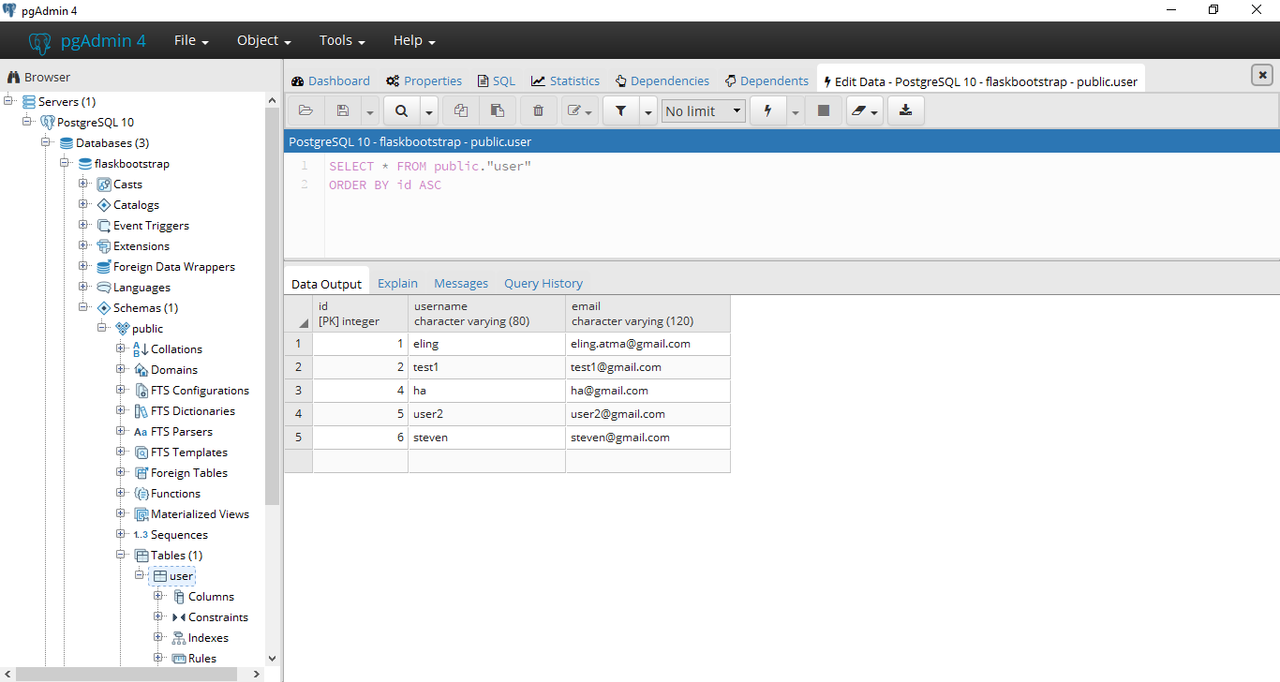
We can create user.id, user.username & user.email to postgreSQL database like this:
and show the database to your browser like this:
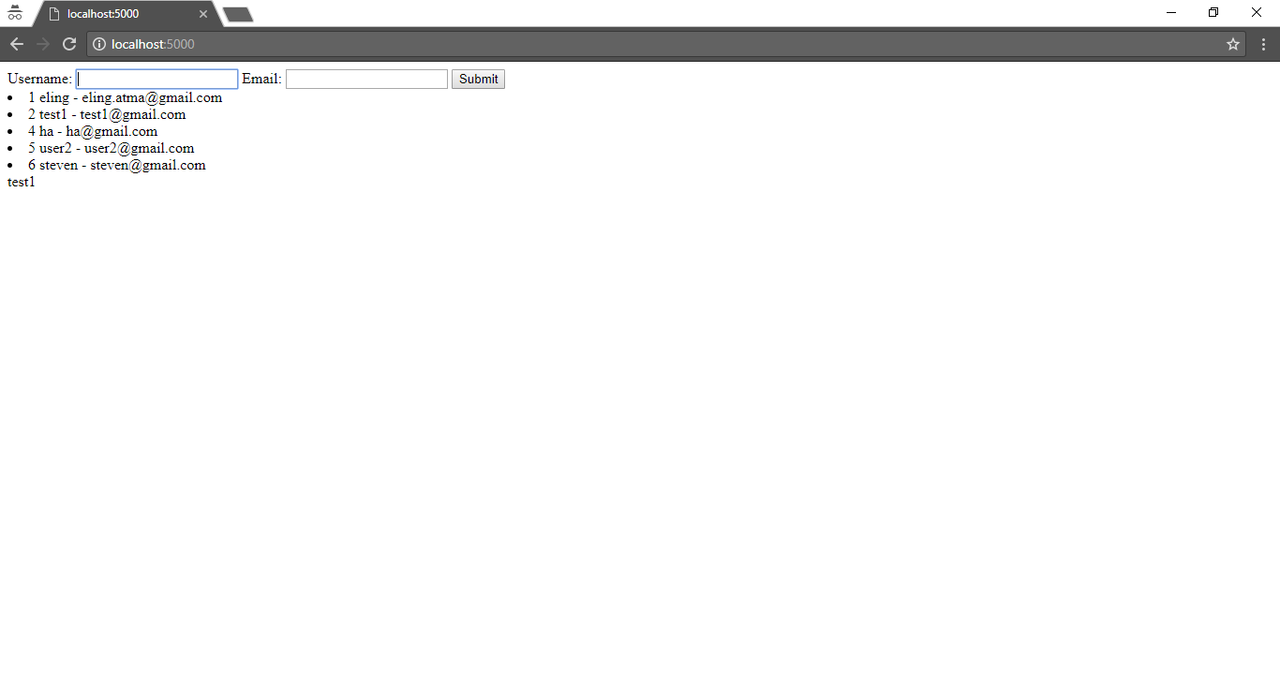
so please can you tell me where is the duplication i have made?
Hello. I'm an Utopian Supervisor and I've just reviewed your work. I will not go into details regarding the "duplicate" rule here, because your tutorial can't be accepted either way.
The first part, the majority, is a installation process which involves just copy-pasting linux commands. This can easily be found in documentation of these packages.
The second part is not a tutorial. It's literally "copy-paste this code and it will work". It doesn't teach the user anything. As such, this tutorial can't be accepted.
You can contact us on Discord.
[utopian-moderator]