

Community post
Delegating STEEM Power using Vessel
Vessel is a versatile STEEM / SBD wallet written by @jesta
You can download the latest version from Github
-
choose the version for your Operating system (Windows, Linux, macOS etc)
-
Once you install the correct version for your OS, the application looks like below.

- Go to accounts as shown in the screen shot and import your steemit.com account

- You will be greeted with a screen like below & choose the import steemit.com account option as shown below

- Enter your Steemit.com user name & password. You should import your active as below and encrypt everything safely as shown below.
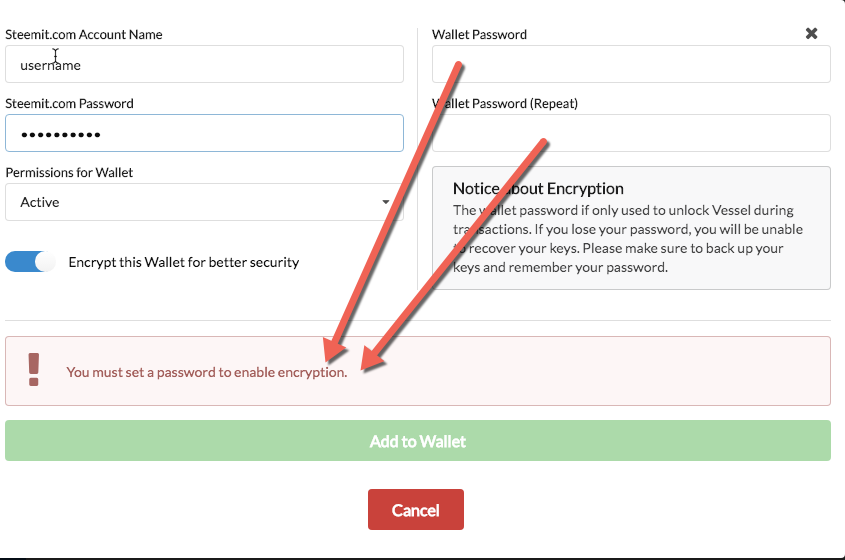
now you are all set of manage your STEEM and SBD from a secure wallet !
How to delegate STEEM Power ?
- Go to accounts as shown below and click on EDIT against the account that you want to delegate from

- Finally, enter the account details and amount you plan to delegate as shown below
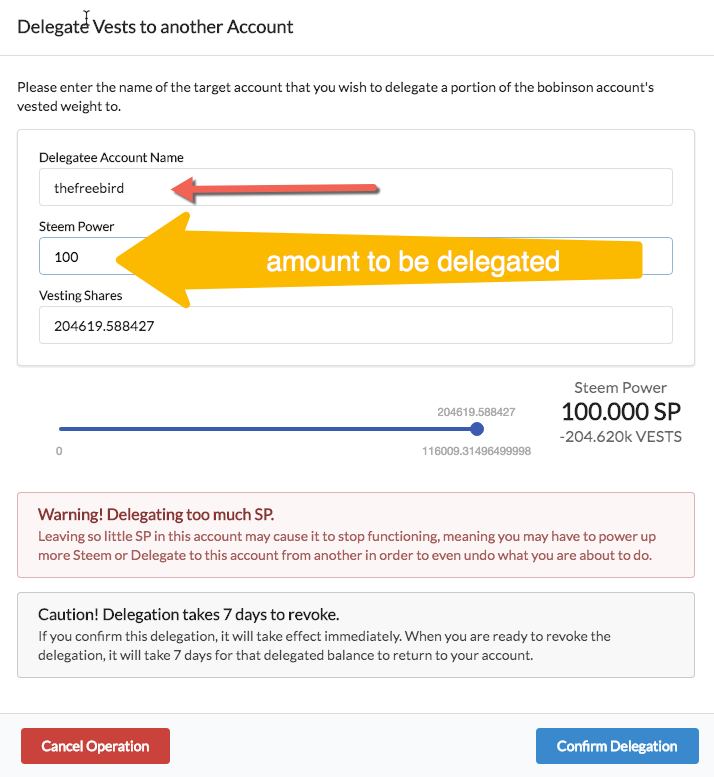
That's it! you are all set.
You can mange delegation in the same way. ie cancel, increase/decrease the amount etc.
Replies (2)
How can this make me earn dollars here. I have been here for a week plus now...no cash. Even with this post :https://steemit.com/steem/@chigozie/steemit-correct-this-abnormality
Hello @chigozie we have got an amazing community here that caters for minnows, do visit this blog to join.click me