

Community post
Guide: Install EOS on an Ubuntu 16.04. Virtual Machine (3/3)
Please make sure you have an Ubuntu 16.04 system running and followed the previous steps from this guide. If not:
https://steemit.com/eos/@guccip/guide-install-eos-on-an-ubuntu-16-04-virtual-machine-beginners
https://steemit.com/eos/@guccip/guide-install-eos-on-an-ubuntu-16-04-virtual-machine-2-3
After you got the error message trying to run eosd for the first time, the config files have been created. Locate them in your file browser going to ~/eos/build/programs/eosd/data-dir

Open config.ini in the standard editor. Paste the following below the last line (has small changes from standard):
# Load the testnet genesis state, which creates some initial block producers with the default key
# genesis-json = /path/to/eos/source/genesis.json
genesis-json = genesis.json
# Enable production on a stale chain, since a single-node test chain is pretty much always stale
# enable-stale-production = true
# Enable block production with the testnet producers
producer-name = inita
producer-name = initb
producer-name = initc
producer-name = initd
producer-name = inite
producer-name = initf
producer-name = initg
producer-name = inith
producer-name = initi
producer-name = initj
producer-name = initk
producer-name = initl
producer-name = initm
producer-name = initn
producer-name = inito
producer-name = initp
producer-name = initq
producer-name = initr
producer-name = inits
producer-name = initt
producer-name = initu
# Load the block producer plugin, so you can produce blocks
plugin = eosio::producer_plugin
# Wallet plugin
plugin = eosio::wallet_api_plugin
# As well as API and HTTP plugins
plugin = eosio::chain_api_plugin
plugin = eosio::http_plugin
It should look like this:

In the upper area edit enable-stale-production to true like in the picture:

Save and close the file.
Next, locate genesis.json in ~/eos/build and copy it.

Paste it into ~/eos/build/programs/eosd/
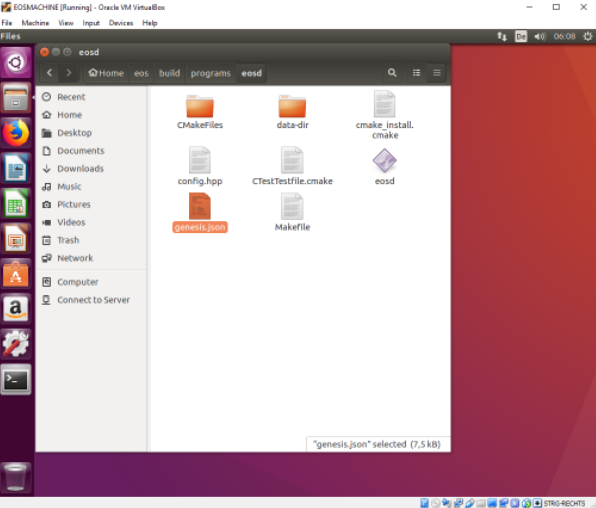
Done. Now you can run ./eosd again from ~/eos/build/programs/eosd/ like in the picture:
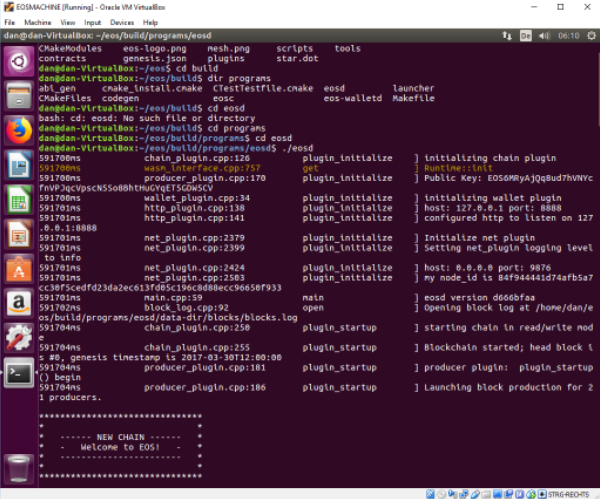
Well done, that's it!
Replies (2)
Congratulations @guccip! You received a personal award!
Click here to view your Board
Vote for @Steemitboard as a witness and get one more award and increased upvotes!
Congratulations @guccip! You received a personal award!
You can view your badges on your Steem Board and compare to others on the Steem Ranking
Do not miss the last post from @steemitboard:
Vote for @Steemitboard as a witness to get one more award and increased upvotes!