

Community post
screen sleep
တစ္ခါတစ္ေလ ကြ်န္ေတာ္တို႔ ကြန္ပ်ဴတာ ကို sleep မျဖစ္ေစခ်င္တာ ရွိမွာေပါ့
တစ္ခါတစ္ေလ screen saver တင္ထားလည္း sleep ျဖစ္သြားတယ္။ download
ခ်ထားတ့ဲ အခ်ိန္ sleep ျဖစ္သြားရင္ အစကျပန္ download ရတာေတြရွိတတ္ပါတယ္။
Sleep မျဖစ္ေအာင္ လုပ္နည္းေတြ အမ်ားၾကီးရွိပါတယ္။ အဲထဲ က အလြယ္ဆံုးနဲ႕ က်ေနာ္
အၾကိဳက္ဆံုးနည္းလမ္းေလးကို ေျပာျပခ်င္ပါတယ္။
၁. Control panel ကို ဖြင့္ပါ။

၂. Power options ကို left click ပါ။
၃. ဒီလိုေလးေပၚလာမယ္။
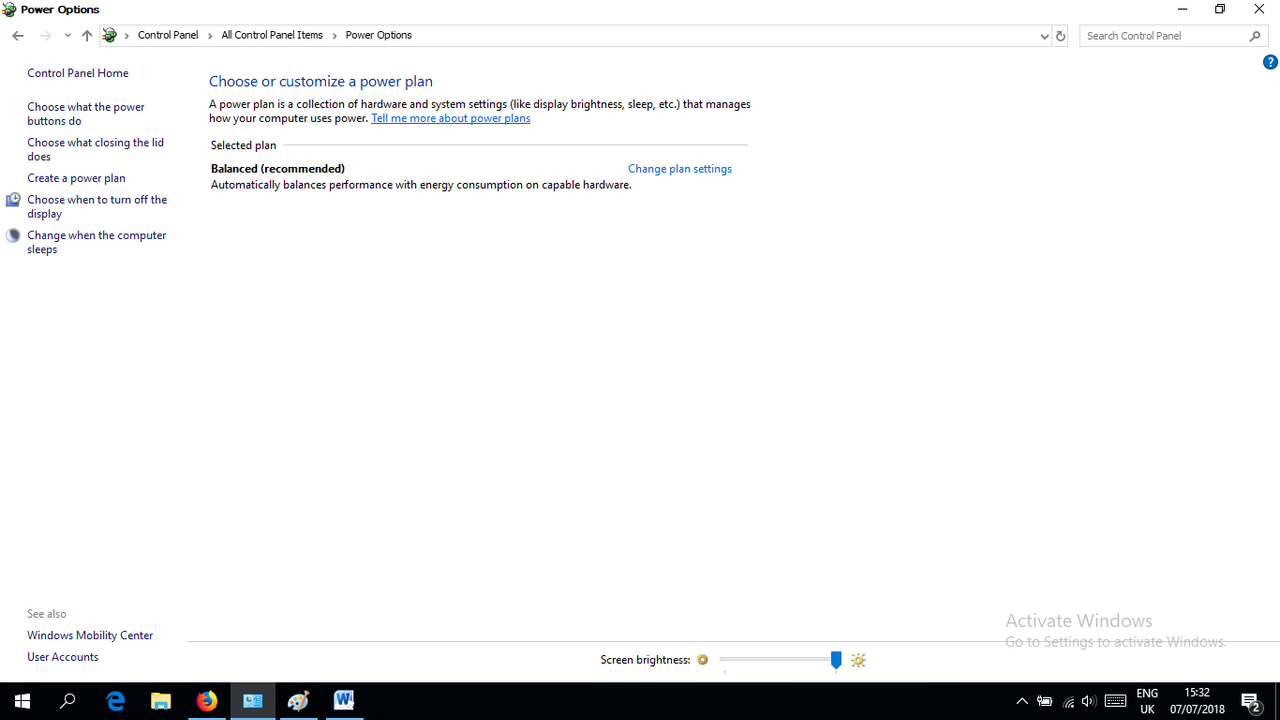
၄.Choose when to trun off the display ကို left click ပါ။

၅. ဒီလိုေလးေပၚလာမယ္။

၆.အခုလို Never လို႔ ေျပာင္းလိုက္ပါ။

၇.save Change ကို click လိုက္ပါ။
ဒါဆို screen sleep လံုး၀ မျဖစ္ေတာ့ပါဘူး။
Replies (3)
This post has received a 2.24 % upvote from @drotto thanks to: @htookhantthawzin.
This post has received a 1.71% upvote from thanks to: @htookhantthawzin!!!
For more information, click here!!!!
If you use our Robot before your post has 1 day and get an Upvote greater than 1%, you will automatically receive Upvotes between 1% and 10% as a bonus from our other robots.
You got a 12.50% upvote from @automation courtesy of @htookhantthawzin! This is a service sponsored by @yehey. Please consider voting @yehey for Witnes. Use this short URL link https://on.king.net/witness simply click and vote, this will redirect to Steem Connect for secure connection.
Interested to earn daily? Delegate Steem Power to receive 90% payout rewards. Use this link https://on.king.net/automation to delegate SP to @Automation.
If you need an extra upvote, join us at https://SteemChat.com discord server.
Have a lovely day.
@Automation - Keep Steeming for a better future.