

Community post
Introduction to Computer Programming - part 4

INTRODUCTION TO PROGRAMMING
I am collating my study notes as part of my education into Computer Programming. In an attempt to increase and improve my own learning, and to help others also (learn by teaching) I will be sharing my notes, as neatly presented as possible, for others to follow along with if they so wish. This is Lesson 4's notes.
EARLIER LESSONS
Lesson 1 Notes
Lesson 2 Notes
Lesson 3 Notes

INTRODUCTION TO COMPUTER PROGRAMMING – STUDY NOTES
LESSON 4
CONTROL FLOW
Control Flow = creating an order in which statements will be executed in a program.
Conditional Statements = tells the program to do a certain action if a condition is met.
The below are examples of conditional statements.
IF STATEMENT
if(true)
{
do this
}
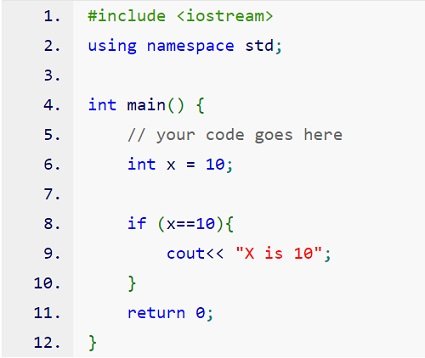
If the statement is [true] then execute the code [do this]
Example of C++ code utilising the if statement.
IF ELSE STATEMENT
if(true)
{
do this
}
else
{
do this instead
}
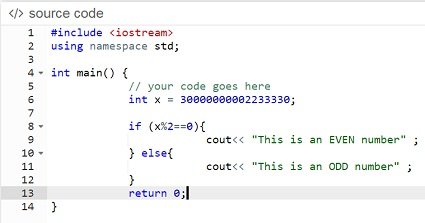
If statement is [true] then execute the code [do this].
Otherwise execute the second code [do this instead]
Defensive programming = offer the else statement to allow for possible issues.
LINK: Defensive Programming
Example of C++ code utilising the if...else statement.
IF THEN STATEMENT
if(true)
{
do this
}
else if(true)
{
do this instead
}
else
{
just do this
}
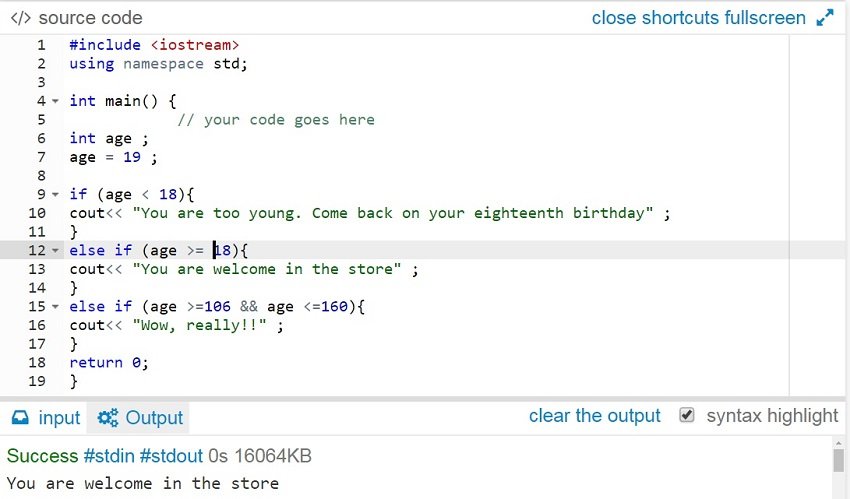
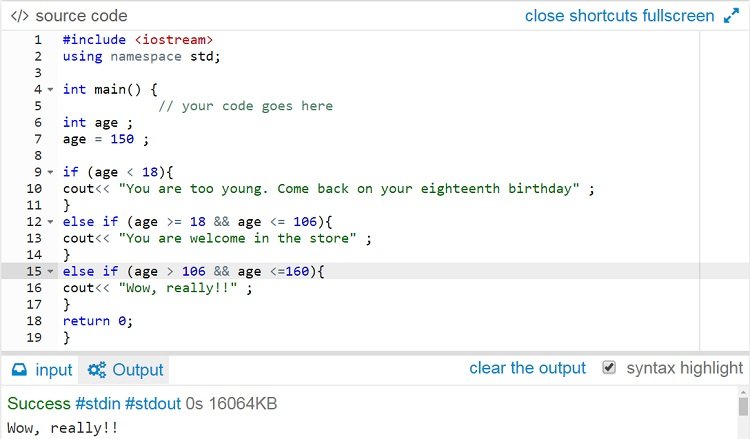
If statement is [true] then execute the code [do this].
If it's not true then check another statement [else] and see if that one is [true]. If it is then execute it's code [do this instead].
There can be more of them to follow. In the above example it is just two.
If neither of them is true, then execute the last code [just do this].
Example of C++ code utilising the if...then statement.
Second example of C++ code utilising the if...then statement.
RECAP OF LESSON 1, 2 AND 3
In Lesson 1 we briefly looked at:
- What is a programming language?
- Language Types – especially HIGH Level and LOW Level.
- Compiled vs Interpreted Languages
- Data Types: Strongly Typed vs Weakly Typed Languages.
- Data Types: The most common data types (characters, integers, floating-point, fixed-point, boolean, reference).
In Lesson 2 we looked briefly looked at:
- Variables
- Constants
These both flow on from Data Types and work with these.
In Lesson 3 we looked briefly at:
- Operators
Used to allow operations (such as multiplication) to be performed on variables or constants.

FURTHER DATA
cpp.sh - C++ shell website
Scratchpad - Shift + F4 on Firefox - Javascript shell
Dev C++ - A free, portable, fast and simple C/C++ IDE
Code::Blocks - A free C, C++ and Fortran IDE
Ideone - an online compiler and debugging tool which allows youto compile source code and execute it online in more than 60 programming languages.
My Posts
Introduction From a Newbie Programmer and Intro - part 2
Introduction to Computer Programming - part 1 (Lesson 1)
Introduction to Computer Programming - part 2 (Lesson 2)
Introduction to Computer Programming - part 3 (Lesson 3)
Images from unsplash.com.
I welcome new followers, and thank you for your upvotes and comments.

Replies (1)
Congratulations! This post has been upvoted from the communal account, @minnowsupport, by humate from the Minnow Support Project. It's a witness project run by aggroed, ausbitbank, teamsteem, theprophet0, someguy123, neoxian, followbtcnews, and netuoso. The goal is to help Steemit grow by supporting Minnows. Please find us at the Peace, Abundance, and Liberty Network (PALnet) Discord Channel. It's a completely public and open space to all members of the Steemit community who voluntarily choose to be there.
If you would like to delegate to the Minnow Support Project you can do so by clicking on the following links: 50SP, 100SP, 250SP, 500SP, 1000SP, 5000SP.
Be sure to leave at least 50SP undelegated on your account.