

Community post
Add CUSTOM ROFILE PICTURE
If you are new on Steemit then, first of all, I welcome you here. Adding a profile picture in Steemit is a bit different but it would be easy once you go through this post.
- You may be wondering why you can't upload a picture from your phone or computer right away. Do not worry i will guide you. Just follow this tutorial.
Yes, you can simple use Steemit to get your image link and upload.
I am using @lawshuttle account to make screenshots.
-
Login to your Steemit account and tap on post.

-
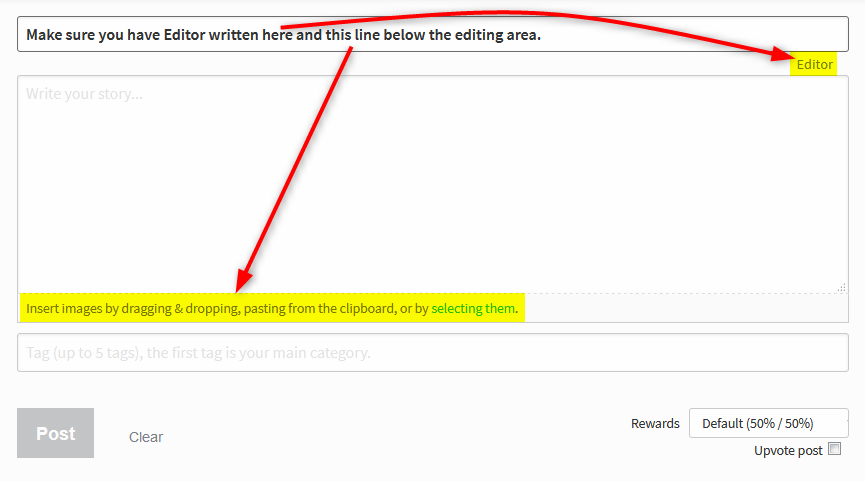
Make sure you are using Mark Down editor as shown below.
-
Click selecting them as visible in the image above (it acts as an Upload button). You will be taken to your device's storage. Select the image you wish to upload. It will be uploaded in the following format, containing the .JPG or .PNG extension in the end.
-
Copy the link that I highlighted above without brackets.

-
Go to settings

-
Paste the copies link from step 4 in the profile url.

-
Click on the update button. Refresh your page and enjoy your new custom profile picture.
Replies (8)
Welcome to Steem. Do read A thumb rule for steemit minnows - 50:100:200:25 for starter tips.
Please bookmark Steem BluePaper and Steem Whitepaper and don't miss reading when you have time.
All the Best!!!
Thank you
Welcome to Steemit. I hope it is good for you. Invite some friends and build the community
Yes sure.. we shall build a community
Very helpful tips..thanks
Congratulations @lawshuttle! You have completed some achievement on Steemit and have been rewarded with new badge(s) :
Click on any badge to view your own Board of Honor on SteemitBoard.
For more information about SteemitBoard, click here
If you no longer want to receive notifications, reply to this comment with the word
STOPIm glad it helped you..
Essential info..... @lawshuttle.