

Community post
Babbage's Difference Engine in Brainfuck on a Calculator
tl;dr: The simplicity of this 1982 programmable calculator makes it possible to become a "guru" just by reading the manual: Since there are no abstraction layers that can fail you can just write whatever you want without wasting your time with demotivating nonsense like googling error messages or seeking through stackoverflow answers. Just code and it works!
Brainfuck Difference Engine on HP 15C Calculator Hardware Clone
I was just sitting in a park, listening to some podcast and wondered "Hey, why not write a Brainfuck interpreter for my calculator?". So I grabbed my notebook and started scribbling.
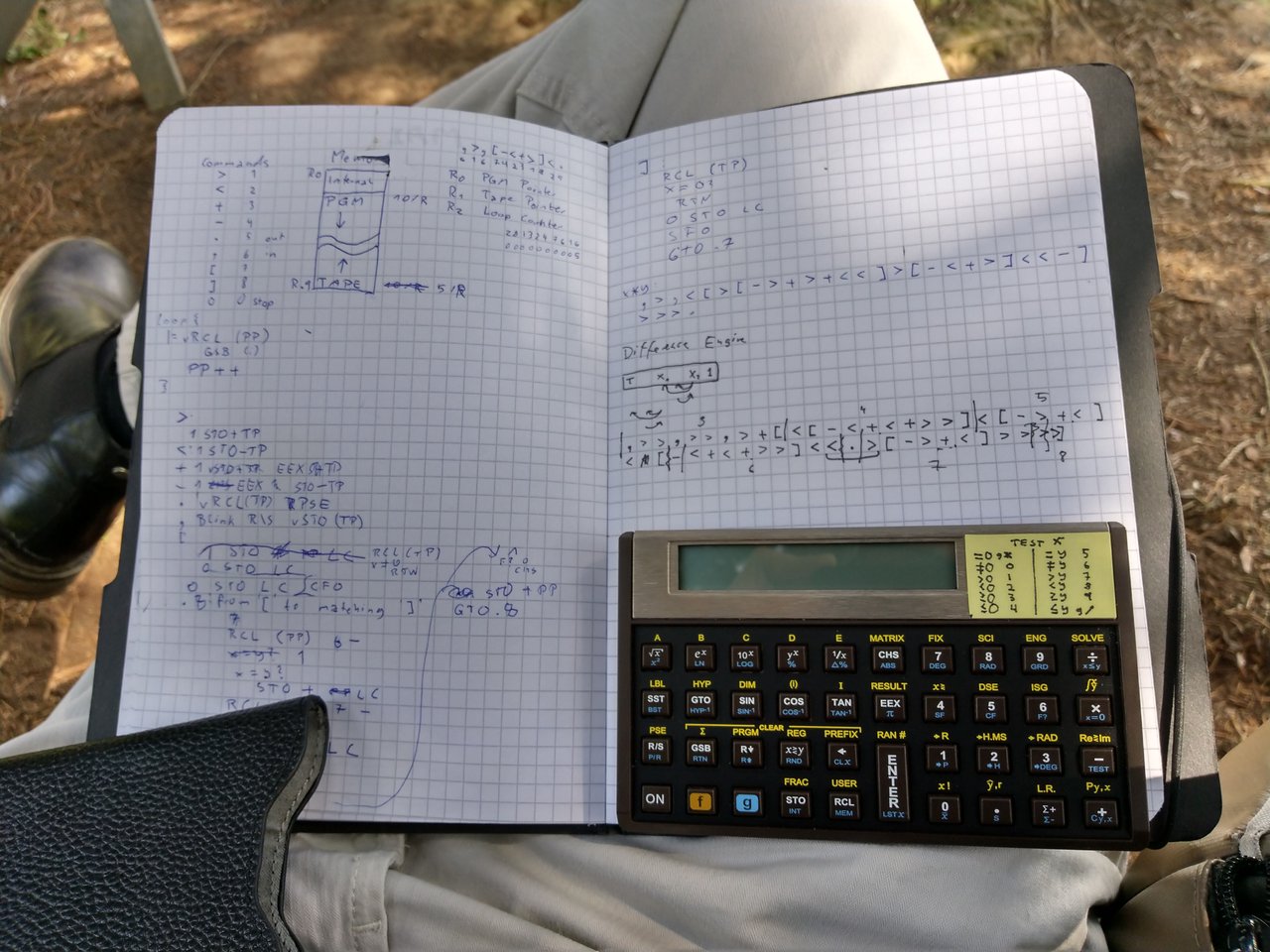
Brainfuck?
It's a programming language that only has eight instructions. The instructions operate on a tape of numbers.
| Instruction | Meaning |
|---|
 >       | Move tape head to the right
 <       | Move tape head to the left
 +       | Increment value at tape head position
 -       | Decrement value at tape head position
 .       | Print value at tape head position
 ,       | Read value from input to tape head position
 [       | Loop: Jump to after the corresponding ] if the value at the tape head position is 0
 ]       | Loop: Jump to after the corresponding [ if the value at the tape head position is not 0
For example, this program prompts the user for two numbers and then adds them together:
,>,[-<+>]<.
For more details, you can read the Wikipedia article on Brainfuck.
HP 15C
It's a programmable calculator from 1982 that has 20 registers of storage and the ability to do indirect register addressing and indirect jumping to labels based on register content, which comes in really handy when interpreting numbers as instructions. See My previous blog post "Programming like it's 1981" about this thing for more details.
Implementing the Interpreter
An interpreter is a program that looks at data and interprets it as a program i.e. executing the instructions encoded in the data. In the case of the 15C calculator this means that there is an interpreter program written in the calculator's unnamed programming language that reads the numbers that are stored in the registers and behaves as if those numbers were Brainfuck instructions. So the first thing we need is a mapping from instructions to numbers:
| Instruction | Number |
|---|
 >       |  1
 <       |  2
 +       |  3
 -       |  4
 .       |  5
 ,       |  6
 [       |  7
 ]       |  8
For example, the program "+[.+]", which prints all natural numbers, would be [3, 7, 5, 3, 8].
Instruction Pointer
If we put the instructions into the registers we need to keep track of which instruction to execute next: One register is used as the instruction pointer and contains the number of the register holding the next instruction to be executed; So we fetch the number from that register, execute the instruction, then add 1 to the instruction pointer and repeat.
Tape Pointer
Since Brainfuck uses a tape head that moves across a tape of numbers, we need to store the tape head position in another register. The ">" command moves the tape head to the right, "<" to the left.
However, since we only have 20 registers in total, we should place code and tape on opposite ends of the register space, which means that the first tape cell is the last register, the second tape cell is the second to last register etc. and the ">" command decreases the tape pointer register by 1 to move "right".
Loops
Brainfuck loops can be nested to an arbitrary depth. A fast implementation would probably use some sort of look-up table for matching the loop brackets, but this would take too many registers so instead I opted for just one register that contains a "loop nesting number".
Consider this program:
[+++++[++++++]++++++]++
The first "[" skips the block if the cell at the tape head position is zero. One solution for finding the matching "]" is to set the loop nesting number to 1, then read the program in the right direction and count each "[" as +1 and each "]" as -1. So when encountering the second "[" in the program, the loop nesting number becomes 2, on the next "]" it becomes 1 again and on the final "]" it becomes 0, which means we found the end of the current block and the program can now resume normal execution.
Jumping from the end of a block to the start works similarly: set the loop nesting number to -1 and seek backwards.
Memory Layout
So we need three special purpose registers, followed by Brainfuck code, followed by the tape. We can allocate the registers like this:
| Register | Content |
|---|---|
| 0 | Instruction pointer |
| 1 | Tape pointer |
| 2 | Loop nesting number |
| 3 | Begin of program code |
| ... | More program code |
| ... | 0 (Signals end of program code) |
| ... | More tape |
| 19 | Begin of tape |
Note that the tape grows backwards from the end of register space. Note that programs can corrupt themselves since there is no bounds checking.
Compacting code
Since 20 registers are not enough to write any interesting programs at one instruction per register, we need a way to put more than one instruction in each register.
The HP 15C uses decimal numbers with a 10 digit mantissa, a 2 digit exponent and a sign, which means we can fit one instruction per digit. Consider this program that calculates fibonacci numbers:
+>+[[->+>+<<]<[->>>+<<<]>>>.]
At one digit per instruction, this fits into just 3 registers:
3137741313
2282741113
2228111580
(Notice that the last number is padded with a 0 on the right side since the code is stored as big endian)
If we want to keep both the fast "one instruction per register"- and the compact "ten instructions per register"-mode we could use flag 0 to distinguish which mode to use.
Compiling code
The mapping of one instruction per register or digit is simple enough to write code directly on the calculator. However, it would be more convenient if we had a compiler that turns Brainfuck code into numbers.
Here's a ruby script that does exactly that:
instruction_table = {
  ">" => 1,
  "<" => 2,
  "+" => 3,
  "-" => 4,
  "." => 5,
  "," => 6,
  "[" => 7,
  "]" => 8
}

program = ARGV[0]
instructions = program.chars
codes = instructions.map { |i| instruction_table[i] }

# Fast program (for programs up to 15 commands long)
if(codes.size <= 15) then
  registers = codes.map.with_index { |instruction, index|  "#{instruction} STO #{index + 3}" }

  puts
  puts "Fast"
  puts "===="
  puts "CF 0"
  puts registers
end

# Compact program
chunks = codes.each_slice(10).to_a.map { |a| a.fill(0, a.size...10) }
registers = chunks.map.with_index { |line, index| "#{line.join} STO #{index + 3}"}

puts
puts "Compact"
puts "======="
puts "SF 0"
puts registers
puts
Just save this as bf.rb and start it like ruby bf.rb "+[.+]" to get an output like this:
Fast
====
CF 0
3 STO 3
7 STO 4
5 STO 5
3 STO 6
8 STO 7

Compact
=======
SF 0
3753800000 STO 3
For programs that won't fit in Fast mode, only the Compact version will be shown:
ruby ../utils/bf_compile.rb "+>+[[->+>+<<]<[->>>+<<<]>>>.]"
Compact
=======
SF 0
3137741313 STO 3
2282741113 STO 4
2228111580 STO 5
Charles Babbage's Difference Engine
The Difference Engine was a machine to tabulate polynomials using divided differences. It wasn't programmable, but it ran a program that was parameterizable so you could use it to calculate different functions, e.g. logarithmic tables or sine tables.

Here is a simple implementation in Brainfuck: ,>>,>>,>+[<[-<+<+>>]<[->+<]<[-<+<+>>]<<.>[->+<]>>>>]
You can enter it into the calculator like this:
SF 0
6116116137 STO 3
2742323118 STO 4
2741328274 STO 5
2323118225 STO 6
1741328111 STO 7
1800000000 STO 8
When you run this program, it will ask you for three numbers corresponding to the initial number column setting of the Difference Engine. Examples:
| Input | Output |
|---|---|
| 0, 1, 0 | Natural numbers (1, 2, 3 ...) |
| 1, 1, 2 | Square numbers (1, 4, 9 ...) |
So there you have it: A running Difference Engine, implemented in Brainfuck, running on a HP 15C calculator from the eighties :)
Program
Now all you have to do is enter the following code into your calculator. After you entered your program, run B to start the interpreter.
- Output will be displayed for one second.
- When input is required, the display will flash. Simply enter a number and hit R/S to continue.
- When the program terminates it will try to display the last output.
Registers
| Register | Content |
|---|---|
| 0 | Instruction Pointer |
| 1 | Tape Pointer |
| 2 | Loop nesting number |
| 3 | Begin of program code |
| ... | More program code |
| ... | 0 (Signals end of program code) |
| ... | More tape |
| 19 | Begin of tape |
Flags
Flag 0 is meant to be set/cleared by the user.
| Flag | Status | Meaning |
|---|---|---|
| 0 | clear | Fast mode (1 instruction per register) |
| 0 | set | Compact mode (10 instructions per register) |
| 1 | clear | Seek forward to matching bracket |
| 1 | set | Seek backward to matching bracket |
Labels
| Label | Content |
|---|---|
| B | Run Brainfuck program |
| C | Clear tape |
| E | vRCL digit |
| 0 | End program |
| 1-8 | Run corresponding Brainfuck instruction |
| 9 | Seek to matching bracket |
| 10 | Fetch current instruction |
| 11 | Execution loop |
| 12 | Clear tape loop |
Code Listing
; init registers
001 - LBL B
  FIX 0
  GSB C
  10
  ENTER
  3
  F? 0
    *
  STO 0
  1
  9
  STO 1
  0
  STO 2

; run program
012 - LBL 11

  ; fetch instruction
  GSB 10

  ; execute instruction
  STO I
  GSB I

  ; increment instruction pointer
  1
  STO + 0

  ; execute next instruction
  GTO 11

; clear tape
019 - LBL C
  CF 1
  3.019
  STO I
  LBL 12
    RCL (i)
    x = 0 ?
      SF 1
    F? 1
      CLx
    STO (i)
    ISG I
      GTO 12
  RTN

; special "stop program" instruction
037 - LBL 0
  ; display last output for convenience
  R/\
  R/S

; ">" (Move tape head to the right)
044 - LBL 1
  1
  STO - 1
  RTN

; "<" (Move tape head to the left)
048 - LBL 2
  1
  STO + 1
  RTN

; "+" (Increment value at tape head position)
052 - LBL 3
  RCL 1
  STO I
  1
  STO + (i)
  RTN

; "-" (Decrement value at tape head position)
058 - LBL 4
  RCL 1
  STO I
  1
  STO - (i)
  RTN

; "." (Output value at tape head position)
064 - LBL 5
  RCL 1
  STO I
  RCL (i)
  PSE
  RTN

; "," (Input value to tape head position)
070 - LBL 6
  RCL 1
  STO I
  CLx
  SF 9 ; blink
  R/S
  CF 9
  STO (i)
  RTN

; "[" (begin loop)
079 - LBL 7
  RCL 1
  STO I
  RCL (i)
  x != 0 ?
    RTN
  0
  STO 2
  CF 1 ; seek forward
  GTO 9

; "]" (end loop)
089 - LBL 8
  RCL 1
  STO I
  RCL (i)
  x = 0 ?
    RTN
  0
  STO 2
  SF 1

098 - LBL 9 ; seek to matching bracket
    GSB 10
    6
    -
    1
    x = y ?
      STO + 2
    GSB 10
    7
    -
    1  ; needed because GSB 10 modifies the stack
    x = y ?
      STO - 2
    RCL 2
    x = 0 ?
      RTN
    1
    F? 1
      CHS
    STO + 0
    GTO 9

; fetch current instruction
119 - LBL 10
  RCL 0
  F? 0
    GTO E
  STO I
  RCL (i)
  RTN

; vRCL digit
126 - LBL E
  ; find correct register
  1
  0
  /
  STO I

  ; find digit index (reversed)
  FRAC
  1
  0
  *
  LSTx
  x><y
  -
  10^x
  RCL (i)
  x><y
  /
  FRAC
  1
  0
  *
  INT
147 - RTN
Example Programs
Add two numbers
,>,[-<+>]<.
 Fast
====
CF 0
6 STO 3
1 STO 4
6 STO 5
7 STO 6
4 STO 7
2 STO 8
3 STO 9
1 STO 10
8 STO 11
2 STO 12
5 STO 13

Compact
=======
SF 0
6167423182 STO 3
5000000000 STO 4
Multiply two numbers
,>,<[>[->+>+<<]>[-<+>]<<-]>>>.
SF 0
6162717413 STO 3
1322817423 STO 4
1822481115 STO 5
Fibonacci Numbers
+>+[[->+>+<<]<[->>>+<<<]>>>.]
SF 0
3137741313 STO 3
2282741113 STO 4
2228111580 STO 5
Difference Engine
,>>,>>,>+[<[-<+<+>>]<[->+<]<<[-<+<+>>]<<.>[->+<]>>>>]
SF 0
6116116137 STO 3
2742323118 STO 4
2741328227 STO 5
4232311822 STO 6
5174132811 STO 7
1180000000 STO 8
Learnings
It's insane how simple and productive it is to write something for the calculator: There is absolutely zero nonsense involved, all you need to know is in the manual, you will never have to look something up on stack overflow, there are no nonsensical errors, you won't have to clear the cache of the IDE etc. Surely there must be a middleground between working on a high tower of faulty abstraction layers and writing in this oldschool machine language.
Software development should be a lot simpler, it's insane how much time is spent on irrelevant nonsense.
Replies (3)
Congratulations @michaelzinn! You received a personal award!
You can view your badges on your Steem Board and compare to others on the Steem Ranking
Do not miss the last post from @steemitboard:
Vote for @Steemitboard as a witness to get one more award and increased upvotes!
I finally figured out how the serial connection works so here is a DM15 M1B friendly memory dump for SwissMicros users:
DM15_M1B
04 000000fffff000 00000000000008 0000000000000c 00000000000eae
08 00000000000000 2faf8befbe2280 00000000000000 00000000000000
14 00000000000000 1b2d2d2d2d2d2d 000000000006e7 00000000000000
18 00000000000000 0000000000007f 00000000a00000 00000000000000
e4 00000000000000 00000000000000 00000000000000 00b2ebfcf0f1a3
e8 fdc586ccfbc5b1 fcf0f1a397fdf0 f10eb286971e50 ff3000ff1980df
ec c351fff1b2ec32 a2df75f1fbf720 ff82df75f1fbf6 20ff0931ff42f0
f0 b2ec8697310819 41ff42f0b27086 973107b29649ff c239ffa2973106
f4 b2dc86973105b2 bddff1973104b2 9ddff1973103b2 81dff102b2a1df
f8 f101c2b400b212 ff9596a251ff31 ffec8602ff97f9 f1f0c0f341ff0c
fc 11ff80dff18997 20ff01ff42f041 f9f140fc50fff3 c1f0f12c60ff0b
A: 000000fffff000 B: 000000fffffeae C: 00000000000eae
S: 00000000000000
M: 395033178ff000 N: 00000000000000 G: 04
...and if you want to enter the code by hand here is a debug friendly program listing:
001 LBL B | 42,21,12
002 FIX 0 | 42, 7, 0
003 GSB C | 32 13
004 1 | 1
005 0 | 0
006 ENTER | 36
007 3 | 3
008 F? 0 | 43, 6, 0
009 * | 20
010 STO 0 | 44 0
011 1 | 1
012 9 | 9
013 STO 1 | 44 1
014 0 | 0
015 STO 2 | 44 2
016 LBL .1 | 42,21,.1
017 GSB .0 | 32 .0
018 STO I | 44 25
019 GSB I | 32 25
020 1 | 1
021 STO+0 | 44,40, 0
022 GTO .1 | 22 .1
023 LBL C | 42,21,13
024 CF 1 | 43, 5, 1
025 3 | 3
026 . | 48
027 0 | 0
028 1 | 1
029 9 | 9
030 STO I | 44 25
031 LBL .2 | 42,21,.2
032 RCL (i) | 45 24
033 x=0 | 43 20
034 SF 1 | 43, 4, 1
035 F? 1 | 43, 6, 1
036 CLx | 43 35
037 STO (i) | 44 24
038 ISG I | 42, 6,25
039 GTO .2 | 22 .2
040 RTN | 43 32
041 LBL 0 | 42,21, 0
042 R_up | 43 33
043 R/S | 31
044 LBL 1 | 42,21, 1
045 1 | 1
046 STO-1 | 44,30, 1
047 RTN | 43 32
048 LBL 2 | 42,21, 2
049 1 | 1
050 STO+1 | 44,40, 1
051 RTN | 43 32
052 LBL 3 | 42,21, 3
053 RCL 1 | 45 1
054 STO I | 44 25
055 1 | 1
056 STO+(i) | 44,40,24
057 RTN | 43 32
058 LBL 4 | 42,21, 4
059 RCL 1 | 45 1
060 STO I | 44 25
061 1 | 1
062 STO-(i) | 44,30,24
063 RTN | 43 32
064 LBL 5 | 42,21, 5
065 RCL 1 | 45 1
066 STO I | 44 25
067 RCL (i) | 45 24
068 PSE | 42 31
069 RTN | 43 32
070 LBL 6 | 42,21, 6
071 RCL 1 | 45 1
072 STO I | 44 25
073 CLx | 43 35
074 SF 9 | 43, 4, 9
075 R/S | 31
076 CF 9 | 43, 5, 9
077 STO (i) | 44 24
078 RTN | 43 32
079 LBL 7 | 42,21, 7
080 RCL 1 | 45 1
081 STO I | 44 25
082 RCL (i) | 45 24
083 TEST 0 | 43,30, 0
084 RTN | 43 32
085 0 | 0
086 STO 2 | 44 2
087 CF 1 | 43, 5, 1
088 GTO 9 | 22 9
089 LBL 8 | 42,21, 8
090 RCL 1 | 45 1
091 STO I | 44 25
092 RCL (i) | 45 24
093 x=0 | 43 20
094 RTN | 43 32
095 0 | 0
096 STO 2 | 44 2
097 SF 1 | 43, 4, 1
098 LBL 9 | 42,21, 9
099 GSB .0 | 32 .0
100 6 | 6
101 - | 30
102 1 | 1
103 TEST 5 | 43,30, 5
104 STO+2 | 44,40, 2
105 GSB .0 | 32 .0
106 7 | 7
107 - | 30
108 1 | 1
109 TEST 5 | 43,30, 5
110 STO-2 | 44,30, 2
111 RCL 2 | 45 2
112 x=0 | 43 20
113 RTN | 43 32
114 1 | 1
115 F? 1 | 43, 6, 1
116 CHS | 16
117 STO+0 | 44,40, 0
118 GTO 9 | 22 9
119 LBL .0 | 42,21,.0
120 RCL 0 | 45 0
121 F? 0 | 43, 6, 0
122 GTO E | 22 15
123 STO I | 44 25
124 RCL (i) | 45 24
125 RTN | 43 32
126 LBL E | 42,21,15
127 1 | 1
128 0 | 0
129 / | 10
130 STO I | 44 25
131 FRAC | 42 44
132 1 | 1
133 0 | 0
134 * | 20
135 LSTx | 43 36
136 x<>y | 34
137 - | 30
138 10^x | 13
139 RCL (i) | 45 24
140 x<>y | 34
141 / | 10
142 FRAC | 42 44
143 1 | 1
144 0 | 0
145 * | 20
146 INT | 43 44
147 RTN | 43 32
Congratulations @michaelzinn! You received a personal award!
You can view your badges on your Steem Board and compare to others on the Steem Ranking
Do not miss the last post from @steemitboard:
Vote for @Steemitboard as a witness to get one more award and increased upvotes!