

Community post
Keep your ERC-20 token safe using MyEtherWallet and Trezor hardware wallet.
This is a step by step tutorial for newbies to keep safe their ERC-20 tokens like QRL, 1ST etc. on MyEtherWallet using Trezor
-
Setup your Trezor device Manual
-
Visit https://www.myetherwallet.com ALWAYS type this address by hand! don´t follow links to myetherwallet. There are a lot scam links around!!!
-
Make sure you are connected to the ETH Node
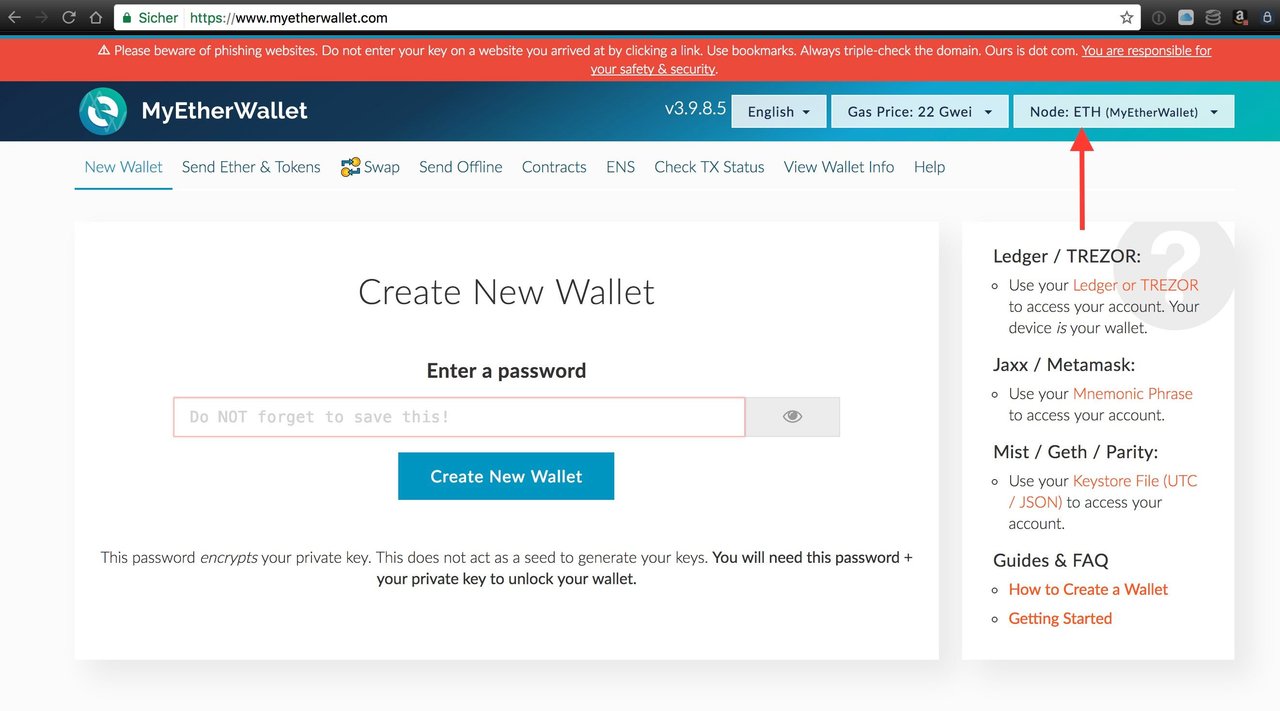
- Don´t click on "New Wallet" ! your Trezor device is already your wallet.
- Click on "send Ether & Tokens"
- on the left select "Trezor"
- Connect to "Trezor"

- A window appears, click on export.

- Enter your current pin

-
Now you have to select the "HD derivation path"
choose m/44' /60' /0' /0
"Trezor ETH" is also shown in the description. -
Select a address you would like to use. Doesn´t matter which one you take. ETH balances will appear later here.
-
Unlock your wallet.

- Next screen shows your ETH wallet.
- Click on "show all Tokens" and check your particular token is available here. Otherwise click "add custom Token" How to add a particular token you can find in most cases on the developers website.
Now you are ready to send your first tokens to myetherwallet. Go to your exchange website click on withdraw and paste the account address there. I recommend to check the pasted address by comparing random some digits. In my case, I always send first a little amount. After success the other tokens follow. Consider that nobody will refund your tokens you send to an unknown address!

Replies (4)
Subscribed.
Hi, we are planning new ICO for Ai and data-science startup.
If you are interested, check please our announcement post https://steemit.com/blockchain/@gromozeka/preico-graphgrail-ai-world-s-first-artificial-intelligence-platform-for-blockchain-with-the-dapps-marketplace
Appreciate this. Good 'lil bootstrap tutorial to get used to MEW
Appreciate it. Great information!
Congratulations @moebius! You have received a personal award!
Click on the badge to view your own Board of Honor on SteemitBoard.