

Community post
Do this before sharing your Steemit articles on Facebook
Hi, I’ve noticed some people have some issues when posting their Steemit article on Facebook or Facebook groups. It will look something like this:

The reasons why Facebook won't pick up your articles' image and full description can vary, but you can find out why and fix them, by using
Facebook Debugger
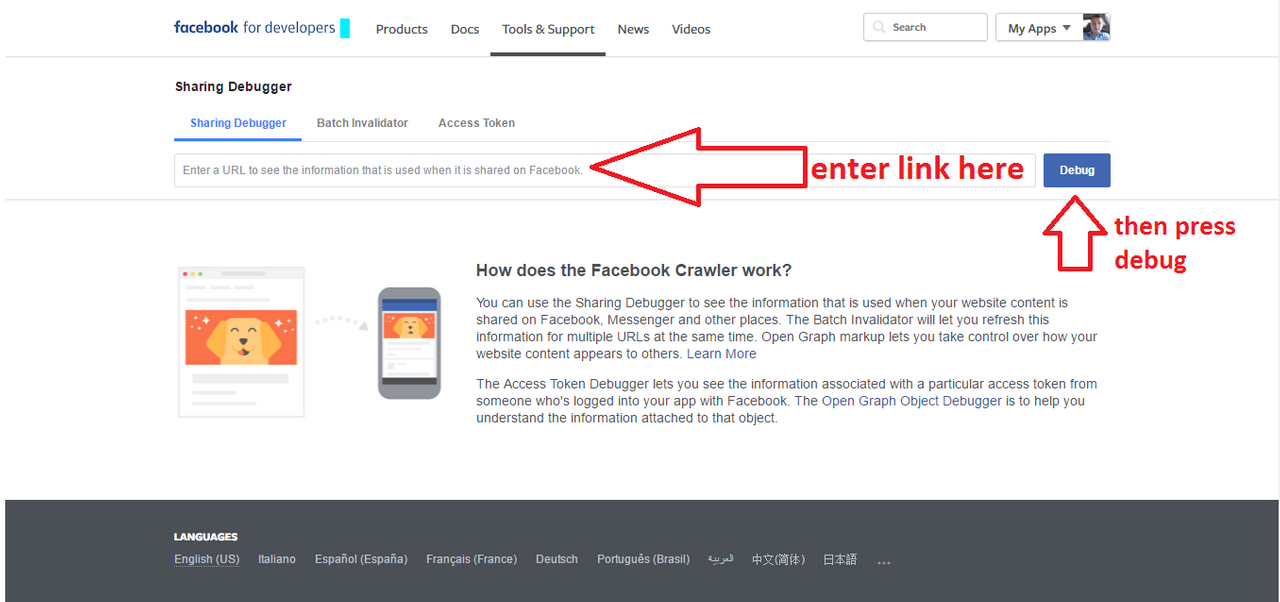
Just enter your article’s link and press Debug
The app will scan your article, and if it's a freshly posted article, it give you the option of fetching new information:

Then it will give some info about what you should fix on your post. It won't always be intelligible for a non-tech savvy person, but sometimes it's useful.
It might tell you that the image you've used for your article is too large (exceeds 8MB). You can fix that by either resizing your image or encoding it via an online service, like Compressor.Io

But what you should definitely do is press the Scrape button.
And finally you get the confirmation that Facebook has "read" your article's metadata.

So, do this after you've posted your article on Steemit, but before posting in Facebook groups or your Facebook profile.
Hope this helps.
Replies (23)
thanks, it is helpful!
yup!
Good to know !
Great article and very helpful munteanu. Tweeted this for you. I hope this picks up some traction.
That's great advice. Many people have no idea this nifty little tool exists.
Good post, Meet the new iPhone (iPhone 8):
https://steemit.com/iphone/@hamzaoui/report-meet-the-new-iphone-iphone-8-the-closest-look-yet-video-and-photo-of-iphone-8
This just shows me again how technologically impaired I am - I thought you just click on the fb button and whala - never tried it but now I know
Great post.
Follow me buddy
@cryoyo
Brilliant! This is really useful... upvoted, resteemed and followed
This post received a 2.2% upvote from @randowhale thanks to @munteanu! For more information, click here!
Heya Dave, yes it's a quite hidden gem of Facebook. I've been using it when promoting my (other) blog posts on FB. Use it at your leisure :)
THank you @phoenixmaid!
indeed
No worries, there's always so much to learn in tech world. Use and enjoy
Oh, yeah, I use it quite often when dealing with Facebook, which fortunately doesn't happen that often nowadays ;)
Thank you, @andreanoronha, followed back.
:) hey you got interesting articles. you got a new follower
Hey @anneke, thanks for the resteem. I am following you ;)
☺
I'm happy to hear that! :)
Bune sfaturi @munteanu !!
Chiar ma gandeam de ce la unele articole nu imi afiseaza poza.
https://imgoat.com/uploads/3e75ff09dd/27669.jpg
Cu placere, @nicolaepavelean. E "tricky" uneori. Bine ca am dat peste tool-ul asta mai demult.