

Community post
Code FreeBitcoin.In Auto Roll
Today I will share the code automatically receive satoshi every 60 minutes. (Note that it only applies when you claim without entering capcha. Want to enter capcha then you play Hi-LO much or load a small amount into Freebitcoin.in you will be recording without entering capcha. )
With this code you do not have to wait every 60 minutes and then get in once, but it is completely automatic.
The advantage of this auto-claim code is that you automatically buy Satoshi rewards packages every time you turn.
Generally you do not have to do just that computer, the rest of the code to do automatically.
Ok, let's get started:
Step 1: Download "Tampermonkey" software available in Google chrome.

Then it will show up like this:


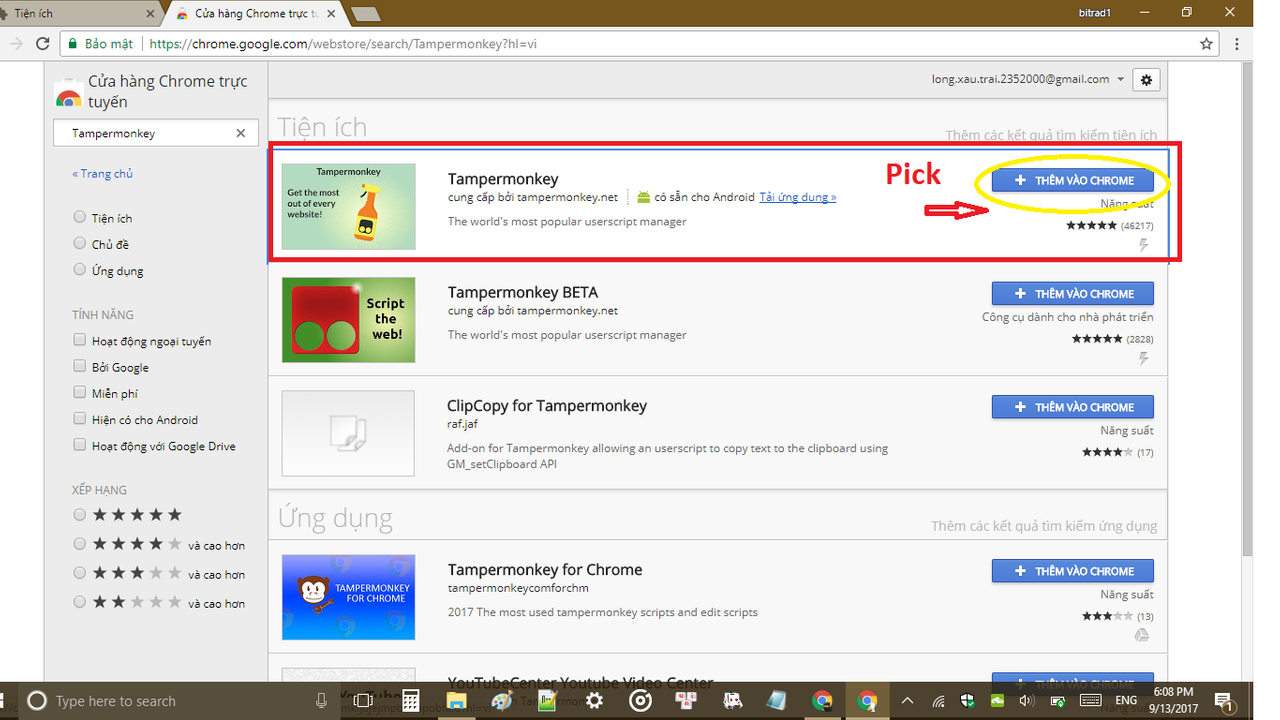
After a few seconds setting it will show up like this: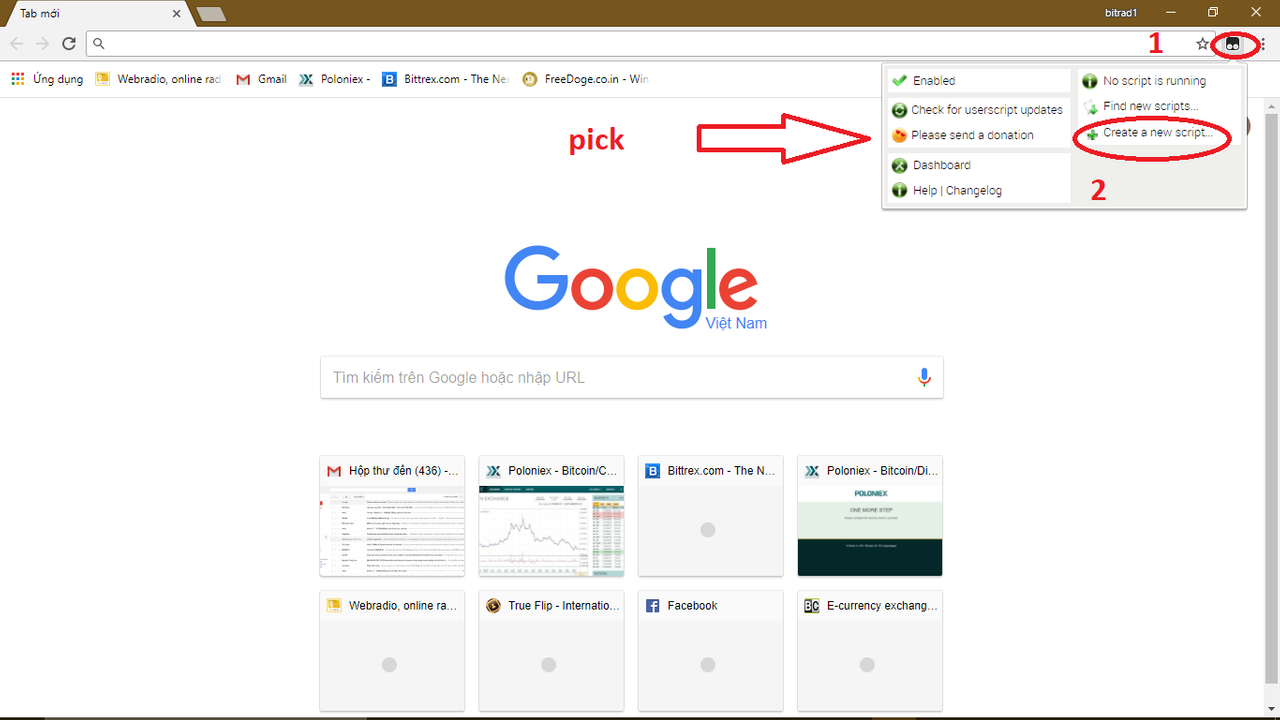
ok after pressing "create new script" it will appear like this.
And delete that line.
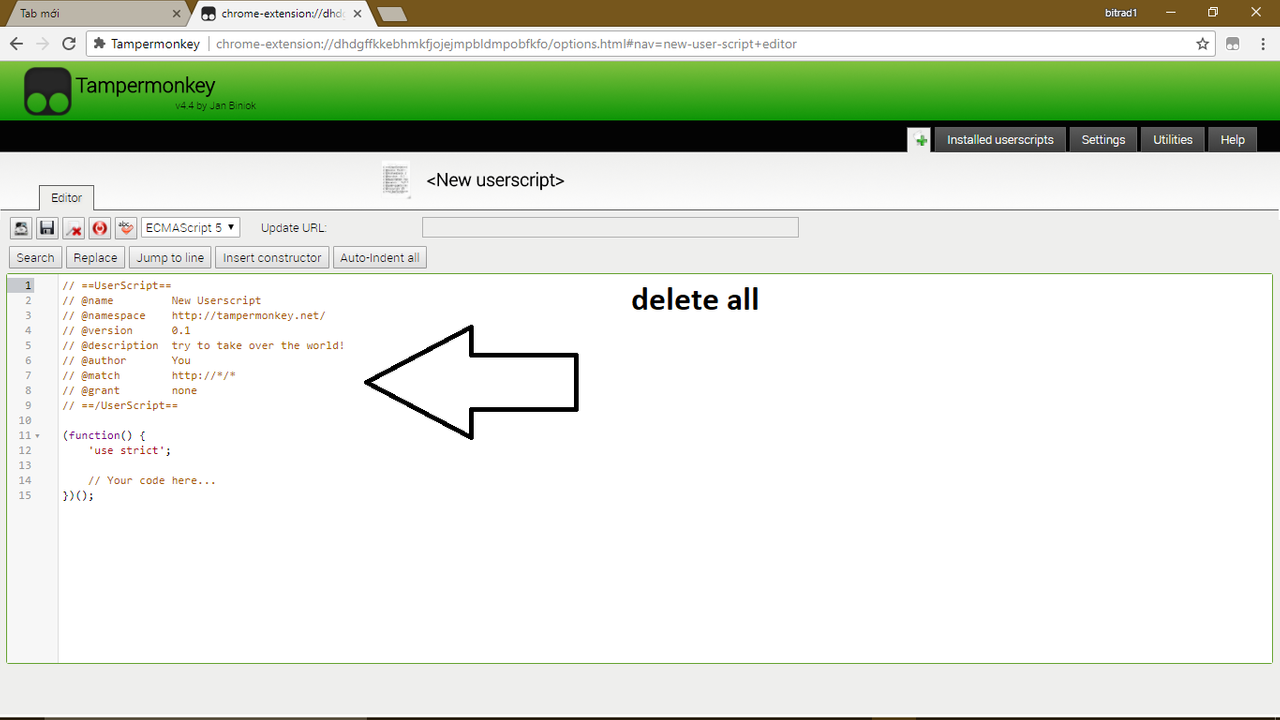
Step 2: Coppy all code
// ==UserScript==
// @name Freebit Autoroll
// @namespace
// @description Auto roll
// @author SilverWolf
// @include https://freebitco.in/*
// @run-at document-end
// @grant GM_addStyle
// @grant GM_getResourceURL
// @grant GM_xmlhttpRequest
// @grant unsafeWindow
// @version 0.0.1
// @icon https://freebitco.in/favicon.ico
// @credit
// ==/UserScript==
var timer = undefined;
var counter = 0;
var remain = 60*6;
function try_roll()
{
var x = document.querySelector("#free_play_form_button"),
myRP = document.getElementsByClassName("user_reward_points"),
y = document.getElementById("bonus_container_free_points"),
z = document.getElementById("bonus_container_fp_bonus");
console.log("Detect if we can roll");
document.title="Can we roll?";
if(y == null){
if(parseInt(myRP[0].innerText.replace(/,/g, '')) >=1200)
setTimeout(function(){
RedeemRPProduct('free_points_100');
}, 3000);
else
if(parseInt(myRP[0].innerText.replace(/,/g, '')) >=600)
setTimeout(function(){
RedeemRPProduct('free_points_50');
}, 3000);
else
if(parseInt(myRP[0].innerText.replace(/,/g, '')) >=120)
setTimeout(function(){
RedeemRPProduct('free_points_10');
}, 3000);
else
if(parseInt(myRP[0].innerText.replace(/,/g, '')) >=12)
setTimeout(function(){
RedeemRPProduct('free_points_1');
}, 3000);
}
if(z==null && parseInt(myRP[0].innerText.replace(/,/g, '')) >= 4400){
setTimeout(function(){
RedeemRPProduct('fp_bonus_1000');
}, 3000);
}
if(x && x.style["display"] != "none")
{
console.log("Rolling...");
document.title="Rooling...";
x.click();
remain = 606;
counter = 0;
}
}
function count_up()
{
counter = counter + 1;
if(counter >= remain)
{
location.reload();
}
try_roll();
}
function auto_roll()
{
if(document.location.href.indexOf("freebitco.in") == -1)
return;
try_roll();
timer = setInterval(count_up, 101000); /* 1 minutes */
}
setTimeout(function(){
auto_roll();
}, 3000);
Step 3: Paste the code you just copied and save code, look like this.

It will appear like this:

Yeahhhh finsh ^^
Now just open freebitcoin and enjoy the results
I hope this article will help you, do not forget to support me so that I have more motivation to write more articles.
Thanks all love you <3
Replies (15)
Congratulations @nguyenlong23! You have completed some achievement on Steemit and have been rewarded with new badge(s) :
Click on any badge to view your own Board of Honor on SteemitBoard.
For more information about SteemitBoard, click here
If you no longer want to receive notifications, reply to this comment with the word
STOPThank you for your sharing.
my freebitcoin always have captchas, do u know how to remove them? thanks!
Thank you so much, I have some freebitcoin accounts rolling 24/7 thanks to you :) working on more accounts.
You can remove the captcha getting the bonus you have when you play the multiplyBTC enought to obtain the extra base hourly satoshi.... so if lets play... you can buy some lottery tickets before betting on the mutliply to speed the bonus.... I have some accounts playing every hour .. sometimes I just roll autobet 100000 times, basete 10satoshi... some ramdom crazy setting to loss the less.
If you have an account with the bonus you want so sell.. I am buying :)
Great read! Thanks brother. Are you guys using vpn to set up other accounts?
is this still working ?
Its a nice bonus there on the website :)
Ah tnx for sharing
yes..
Update with the new reward points spending button : https://pastebin.com/cGKRUg6x
muchas gracias por el aporte, como aria para borrar la linea de comando para que solo de el roll? que no active los bonus?
fake
falso??? que raro porque a mi si me esta sirviendo, cosa que tu no sepas hacerlo funcionar eso es otro caso
mind if i ask? how do you operate multiple accounts at the same time? how to solve the VPN problem?