

Community post
Use Smartphone As Computer Touchpad And Keyboard

At the beginning of the story I wanted to sit or lie on the couch while playing a smartphone, but I also wanted to control my next computer. Until you think about it, it seems interesting to be able to control the computer, either as a keyboard or mouse using a smartphone. Hingaa I finally found "RemoteMouse.net". And what's cool is, RemoteMouse is available for both Android, iOS, MacOS, Linux and Windows.
Here I want revuew this free version of RemoteMouse, is it worthy of it's name. The device that I will use is:
- Macbook Pro dengan Mac OS high sierra
- Sony Xperia XA 2 dengan Android oreo
Available for Many Platform
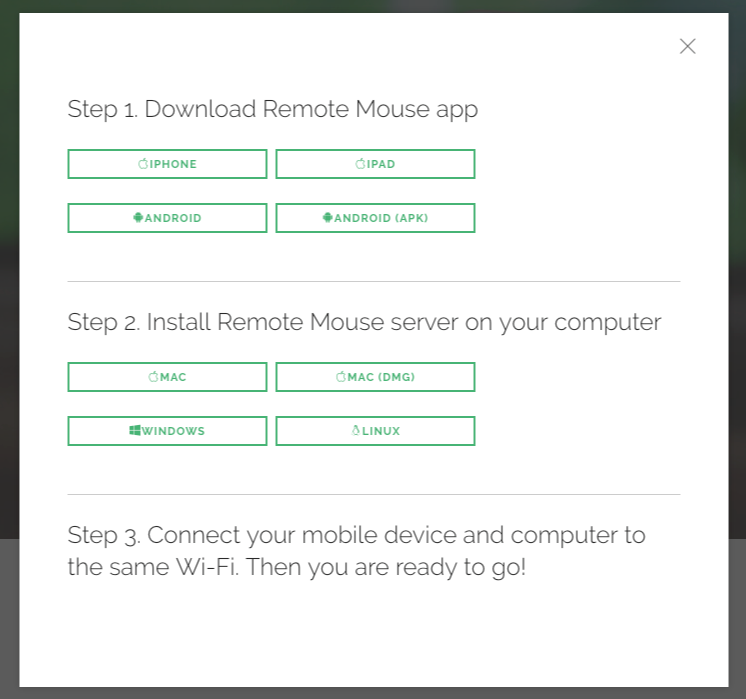
RemoteMouse is available in 2 variants, namely RemoteMouse server intended for computers and RemoteMouse app intended for mobile, here are some platforms provided, which you can visit via the following url http://www.remotemouse.net/ :
RemoteMouse server, available for :
- Mac OS
- Linux (binary)
- Windows
RemoteMouse app/client, available for : - Android
- iOS iPhone
- iOS iPad
Hands on
How To Connect
To be able to use RemoteMouse, make sure the computer and smartphone are on the same network, in this case I connect to the same wifi. After everything is installed both from the server and app side, note the ip server, to start the connection manually from the app, but it doesn't close the possibility RemoteMouse app will automatically detect the server available in the existing network. I have never experienced this server autodettect problem.

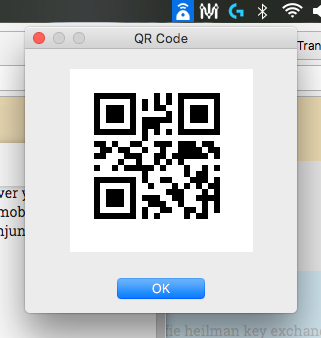
Besides connecting using ip or dettect, there is one more option provided, namely using qr code.
Touch Pad Mode

It's not as smooth as using an original touchpad / mouse, but at least it works. If you want maximum results, you can use wifi tethering to then let the server connect through that network. For other key functions, like right / left, double finger click to right click, even pinch to zoom can be done well in this mode.
The cool thing is, you can change the touchpad background to any image that you want.
I found a problem with my device, when changing position to landscape the touchpad cannot be used at all. But it turns out that landscape mode is a different feature, namely full version of keyboard and touchpad which is a premium feature, you must pay according to the conditions to activate this feature.
Keyboard Mode

When activating this mode, the touchpad is still displayed only there is an additional default keyboard that appears. Just like the touchpad, it's not as smooth as using an original touchpad / mouse, but at least it works. If you want maximum results, you can use wifi tethering to then let the server connect through that network.
Talking with the keyboard on a mobile device, of course it is not free with voice typing, yes this app also supports voice typing, the accuracy and speed results apart from depending on your smartphone hardware also depends on the speed of internet connection.
Mission Control

Cool enough with this one feature. You will get any application list that is running on your computer. By clicking on the icon, it is possible to switch applications quickly.
Power Buttons
Various actions related to power can also be found here, either Shutdown, Sleep, Restart and log off.
Premium Feature

This premium feature is an additional remote feature outside the list that I wrote above. That is the multimedia button. Through this button you can do remote for media, such as play, pause, forward, backward, volume and so on, which can also be used to control the presentation.

This feature will be active in landscape mode, you can make fullscreen mode for both the mouse, keyboard or a combination of both. And there will be additional modifier keys such as Ctrl, Shift and so on.
Advantages
Before using the main features, of course the first thing to do is how the app and server can be connected, RemoteMouse has a very easy way for the users to connect between the app and server.
All the features I need for remote work on a computer using a smartphone have been fulfilled, even with extra features such as power buttons and mission control, making work easier and faster.
Deficiency
Using a WIFI connection can be interrupted with several other network activities, if RemoteMouse provides Bluetooth connectivity features such as those done by magic mice and similar products, it is possible that the performance will increase more significantly.
Replies (0)
Conversation
No replies yet
Replies will appear here as people join the conversation.