

Community post
Tutorial- How to install steem python and use steem CLI on Ubuntu 16.04
Today I'll show you how to install official steem python library on Ubuntu 16.04
You can also run it on any flavor of linux like centOS , fedora etc. If you dont have one check here to run it as virtual player on windows machine.
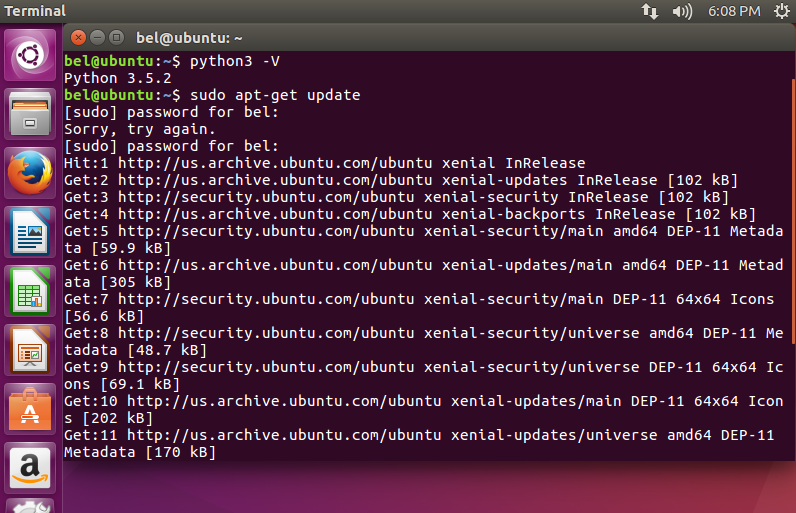
For steem python we need python 3.5 or higher, lucky for us ,ubuntu 16.04 already has python 3.5 built-in.
Now we need to go to terminal and type following commands:
sudo apt-get update
Install ssl library:
sudo apt-get install libssl-dev

Next we need to install pip:
sudo apt-get install -y python3-pip

Its time to install steem python, note this should take more than a minute:
pip3 install -U steem

Now that we have steem python installed, lets import our steemit acccount:
steempy import <accountname>
It will prompt you to enter your steemit password, after that you will have to create a local steempy password, confirm it and voila, you have successfully imported your steemit account.

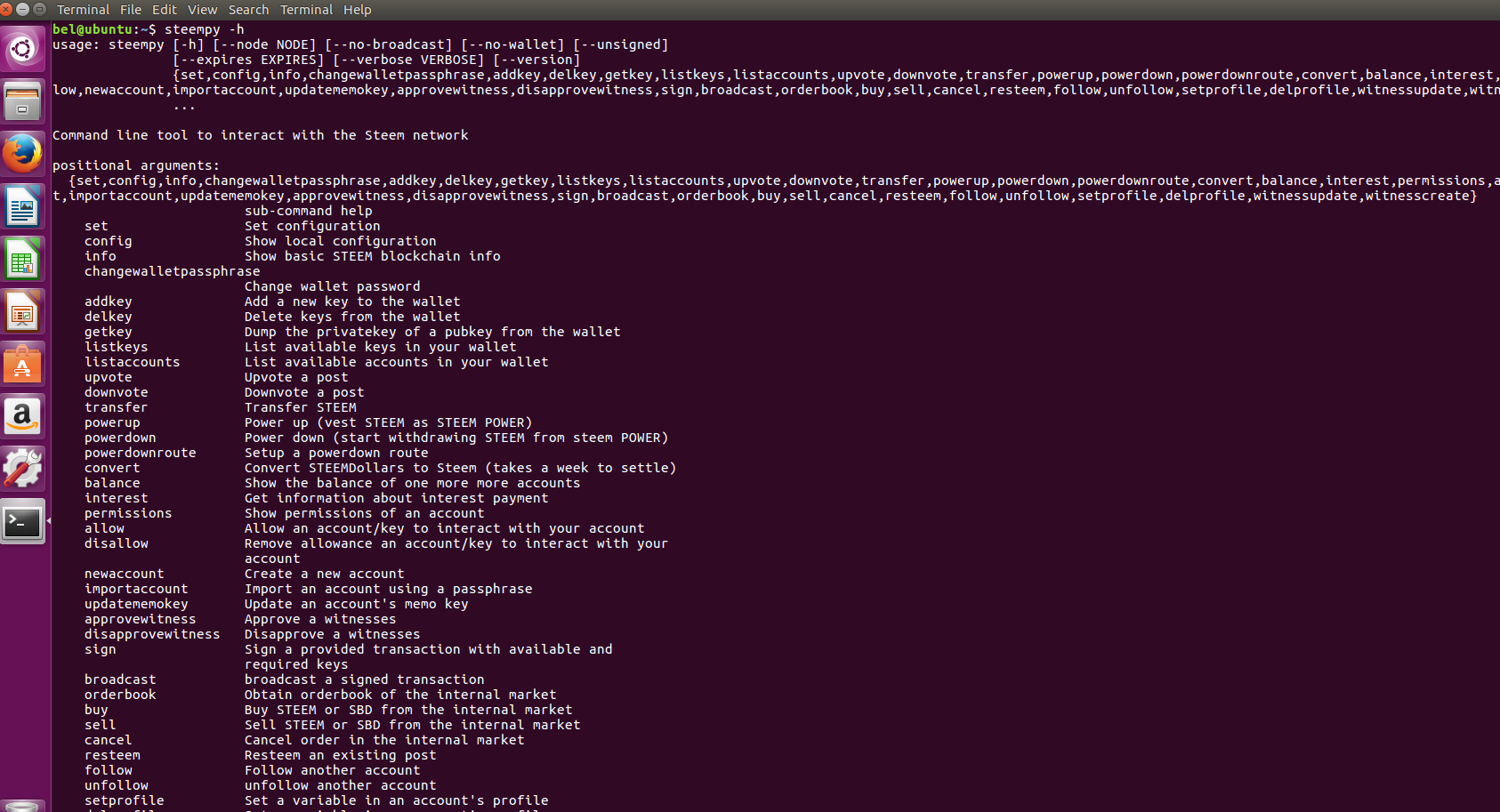
Now that you have your account imported ,you can do lots of fun stuff, to get started with list of commands:
steempy -h
Go ahead and play around :)
Replies (17)
useful information
meep
Congratulations! This post has been upvoted from the communal account, @minnowsupport, by orionsbelt from the Minnow Support Project. It's a witness project run by aggroed, ausbitbank, teamsteem, theprophet0, someguy123, neoxian, followbtcnews/crimsonclad, and netuoso. The goal is to help Steemit grow by supporting Minnows and creating a social network. Please find us in the Peace, Abundance, and Liberty Network (PALnet) Discord Channel. It's a completely public and open space to all members of the Steemit community who voluntarily choose to be there.
Great info, thanks a lot. I am trying hard, and making progress. This bit is not working. The error msg is
could not import setuptools which is required to install from a sourde distribution. Please install setuptools.
I cannot install setuptools. Been trying a lot of things I found, with no luck. Can you help me?
Try
sudo pip3 install -U setuptoolsGood! setuptools installed! Let's see how I do from here.
Thanks so much. Steempy : command not found. I make progress little by little! The steem installation was long, but I think did not go completely well because there is a long message at the end that starts with EXCEPTION
This post has received a 3.61 % upvote from @booster thanks to: @orionsbelt.
Whats the exception error?
Upvoted and following you, please also have a look at my blog and the Steemit projects i'm working on.
Thanks so much for your reply.
I ran this command again:
pip3 install -U steem
I did not get the exception error this time, apparently. This is the error message this time:
Command "/usr/bin/python3 -u -c "import setuptools, tokenize;file='/tmp/pip-build-qyjiki0u/diff-match-patch/setup.py';f=getattr(tokenize, 'open', open)(file);code=f.read().replace('\r\n', '\n');f.close();exec(compile(code, file, 'exec'))" install --record /tmp/pip-ac2_k6gd-record/install-record.txt --single-version-externally-managed --compile" failed with error code 1 in /tmp/pip-build-qyjiki0u/diff-match-patch/
try installing as superuser
sudo pip3 install -U steemThank you for your great help and your patience. I did as you say. The process starts with this message, in yellow:
The directory '/home/julio/.cache/pip/http' or its parent directory is not owned by the current user and the cache has been disabled. Please check the permissions and owner of that directory. If executing pip with sudo, you may want sudo's -H flag.
The directory '/home/julio/.cache/pip' or its parent directory is not owned by the current user and caching wheels has been disabled. check the permissions and owner of that directory. If executing pip with sudo, you may want sudo's -H flag.
Process ends with this message:
ompilation terminated.
error: command 'x86_64-linux-gnu-gcc' failed with exit status 1
Command "/usr/bin/python3 -u -c "import setuptools, tokenize;file='/tmp/pip-build-uumczq4y/scrypt/setup.py';f=getattr(tokenize, 'open', open)(file);code=f.read().replace('\r\n', '\n');f.close();exec(compile(code, file, 'exec'))" install --record /tmp/pip-o2nmvx3c-record/install-record.txt --single-version-externally-managed --compile" failed with error code 1 in /tmp/pip-build-uumczq4y/scrypt/
hmm..seems like your missing some dependency, i'd suggest upgrading to newer python version and then try
Thank you so much.
I have Anaconda installed in my Windows machine. I do not know how to upgrade python in my Linux machine. Can I do all this in Anaconda, perhaps in a Jupyter notebook? Or maybe you can give some guidance on how to upgrade python in my linux mint installation. I have tried different ways, with no luck. I do not even remember what I did, but I tried. Same thing with pip. I recieve messages that I have an old version, 8.1.1, but when I do as the message says to upgrade to 9.0.1, I receive a message that the system is already up to date.
Haven't used anaconda..hit me up on steemit chat or discord
Ok I´ll do that. Thank you!