

Community post
Tutorial-How to run Dr doogie script by inertia
Today I'll show you how to run https://steemit.com/radiator/@inertia/drdoogie-rb-vote-trail-script
You will need linux or any flavor of linux like ubuntu ,centOS or fedora. If you dont have one check here to run it as virtual player on windows machine.
You will also need ruby and gem installed on linux, if you don't have it check here uptil step 11.
Now we are ready to download dr doogie and run, here are commands
$ git clone https://gist.github.com/d57c9bc744f05ada01d173521c01df8a.git drdoogie
$ cd drdoogie
$ bundle install

Open drdoogie folder and then open drdoogie.yml. You need to replace social username and private key with your own under voters. You can also add as many trailers as you need. I've used 2 as example.
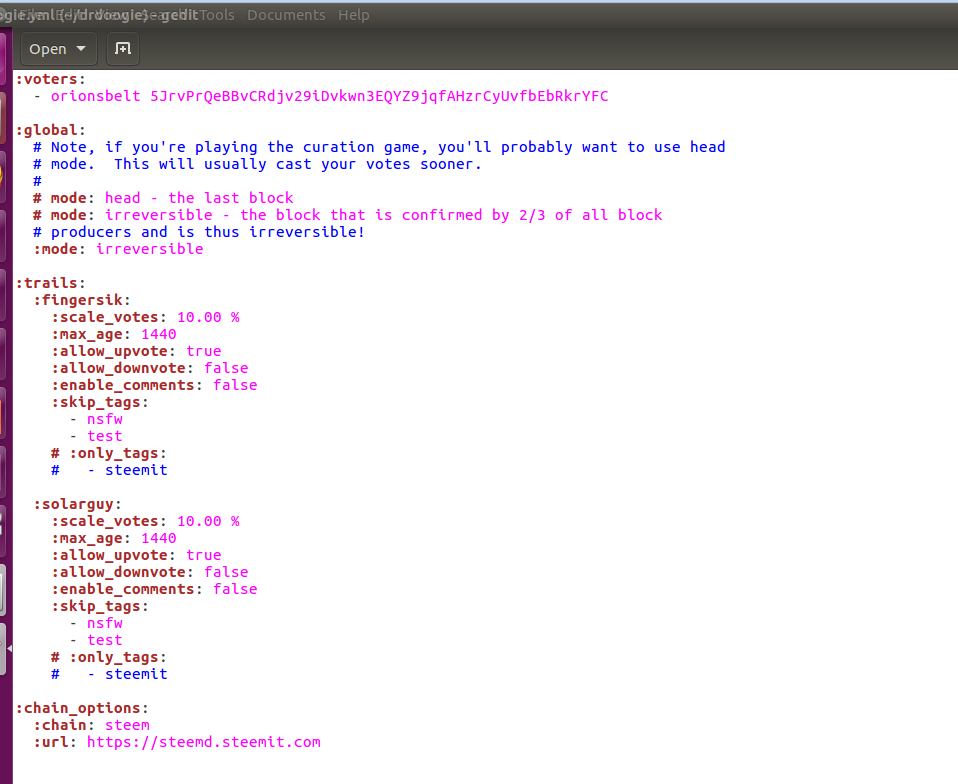
Once done save and return to terminal.
Type in
ruby drdoogie.rb
And your all set! 
Replies (0)
Conversation
No replies yet
Replies will appear here as people join the conversation.