

Community post
Auto reply can be given on Facebook page
If you want, you can also set the auto reply system on your personal Facebook page. How to do it is explained in this tutorial. After logging in to Facebook, you have to go to the page where you want to start Auto Reply.
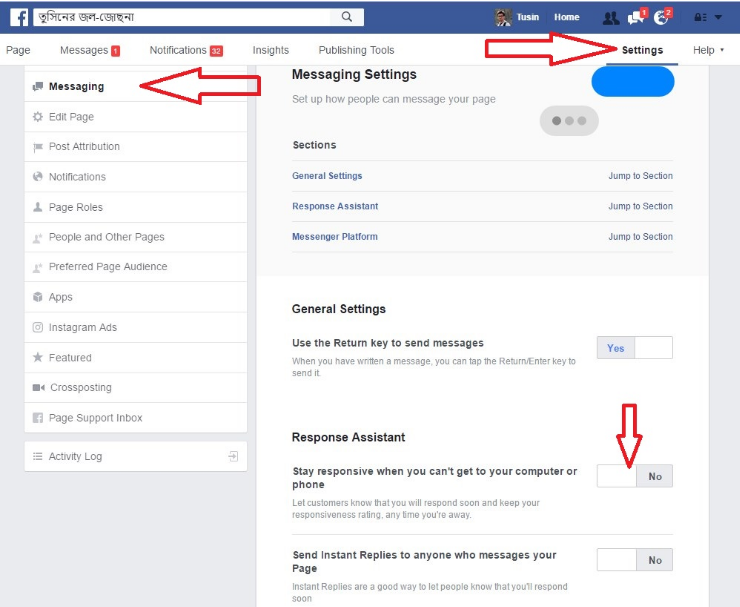
Then you have to click on the settings option on the top left side of the page. Then it will show many options. From these you have to click on the ‘messaging’ option on the left side. From there, if you go to the 'Send Instant Replies to anyone who messages your Page' option, you will see that the initial position is in the 'no' state. To turn on the automatic message option, you have to turn it into 'yes'. Thanks for messaging us. We try to be as responsive as possible. We'll get back to you soon. "
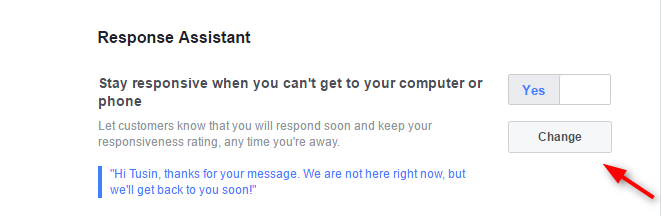
Auto reply can be changed at will. For this you have to click on the ‘change’ option under the ‘yes’ button. Then you can enter the message you want to write in the ‘Your Instant Reply’ box. Then you have to save. Then if someone sends a message on your page, even if you are not online, it will reply automatically.
#facebook #page #help #online
Replies (0)
Conversation
No replies yet
Replies will appear here as people join the conversation.