

Community post
Make Your Computer System Fast. | Extend Your computer's Life! | Never Do these Things!!
These are the things that can make your computer fast and extend your computer's life. If you want your computer to work properly and live longer then you should see this post.
So, let's get started.
1.
http://i53.tinypic.com/2h37sjn.jpgPeople often do this. Never cover the vents of your CPU. You should never do this. Those vents are for air outlet and cools the interior processor of the computer with the help of fans. If you cover those then it will cause heating and can weakens your computer. So, you must take care of this and place your CPU in a little open space.
2.
http://jmri.org/install/images/WinDebugLog-02_SystemFiles.pngNow, children often do this to free up some memory. They go to C drive and delete some system files. So that, they can install and play more games. So, one should never delete system files. Otherwise your Operating system will crash and you will find yourself in trouble.
3.
https://s22908.pcdn.co/wp-content/uploads/2016/04/antivirus-guide-1-696x450.jpgThis mistake is common and can be seen in your daily life. Possibly your one of your friend is doing this. One should never surf the internet without a proper antivirus. This is because, we go to different websites where many popups are there, maybe there is some javascript file that can compromise your system. Hackers can get into your system. Viruses, malwares can get into your system and cause trouble for you. So, it is must to have a good antivirus software in your system to surf securely on web.
4.
https://www.theprairiehomestead.com/wp-content/uploads/2012/02/screencleanerpin.pngNever, clean your computer screen/monitor with wet cloth or with water. This can disturb your computer screen if some water enters into your screen somehow. This doesn't happen usually. So, take care of this.
5.
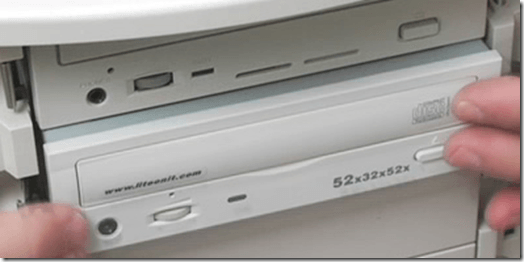Never force your computer to do some work. Like,I have seen people opening DVD drives and instead of tapping the button they push manually DVD drive by forcing it to go inside fastly. This can permanently damage your DVD drive.
6.
https://i.ytimg.com/vi/vg-tNjoQ4yM/maxresdefault.jpgNever put same passwords everywhere. Most of the people put same password on every website they website or login. You should never do this. For making yourself and your system more secure, you must put different passwords on each website. So, that if someone gets your password, he/she can't affect you deeply.
7.
https://cdn.pcsteps.com/wp-content/uploads/2018/02/How-To-Safele-The-Dust-From-Your-Computer-15.pngClean your computers after removing all the wires and plugs and cutting all the power supply of your computer. This is because, if you do clean or repair your computer while it is plugged in with power sockets then short circuits may happen and damage your motherboard. Hence, your computer will never start again. Newbies do this thing more. So, take care of this.
8.
https://www.thenakedscientists.com/sites/default/files/styles/featured_image/public/media/xdistorting_1.jpg,qitok=1tyD-z4O.pagespeed.ic.xfsp0v4uFA.jpgLast thing is never put a magnet near CRT monitor and your computer harddisk. These things contain magnetic systems and bringing another magnet can cause disturbances. These things get disturbed near a magnet. So, be careful.
That's all and have a good day.
https://steemitimages.com/DQmNsZAckGSfAqqg1i8mEhzg3Zd8utHXUdkkz76kFYCDQH9/12356.gif
Replies (3)
This post has received a 4.58 % upvote from @boomerang.
Congratulations @sachcorps! You have completed the following achievement on the Steem blockchain and have been rewarded with new badge(s) :
Click on the badge to view your Board of Honor.
If you no longer want to receive notifications, reply to this comment with the word
STOPDo not miss the last post from @steemitboard:
Your post had been curated by the @buildawhale team and mentioned here:
https://steemit.com/curation/@buildawhale/buildawhale-curation-digest-10-23-18
Keep up the good work and original content, everyone appreciates it!