

Community post
[Cluster Daemon - Clustd] Automatic DNS Record Updating using Cloudflare
Introduction
Clustd is an open source cluster management provider. The goal is to provide automated failover systems for apps, whether the system is down for maintenance or an unexpected event. It features completely automatic health checking with plug and play driver support. These drivers bring the functionality of the cluster alive by managing the system or even external resources on the fly.
Disclaimer: This is not intended to be used in conjunction with software that stores data on its own (e.g. database) , otherwise data will be out of sync. For synchronizing data, see your database manual or another synchronization method (e.g. rsync).
What does a cluster look like?
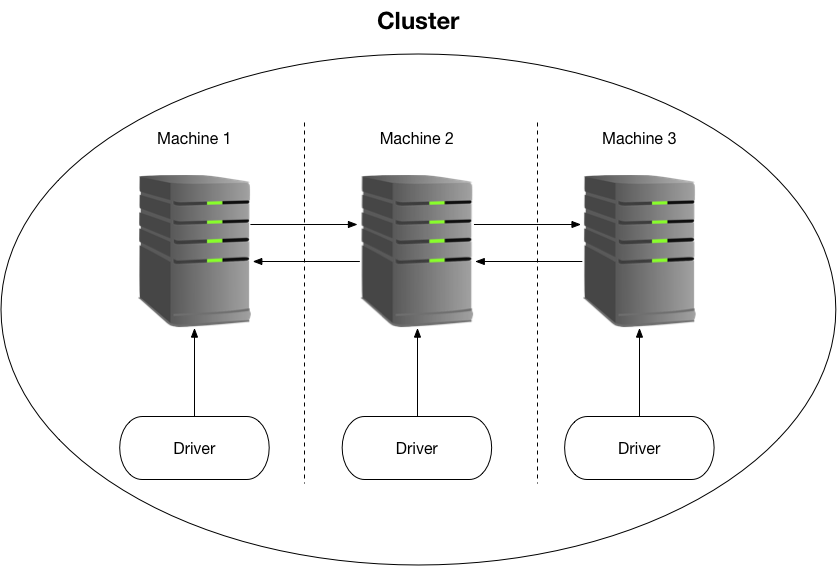
Each machine runs a clustd daemon. Clustd will automatically determine a new master if a machine goes offline. Driver triggers will be executed when a master machine goes offline. Drivers are intended to connect to a locally running clustd instance. Multiple drivers (even of the same type) can connect to the clustd instance to manage multiple services.
The Cloudflare Driver
The purpose of this driver is to automatically update DNS records. In the event some publicly accessible service goes offline, this driver can handle switching the DNS records to an online failover machine. An example setup could be running a shell driver and Cloudflare driver on the same machine. If the master goes offline, the shell driver can start the web app and update the DNS records for complete failover protection.
Configuring the driver is simple and straight forward. Multiple DNS records aren't currently supported, but you can run multiple Cloudflare drivers to get around this limitation, if it's necessary to update multiple records.
host: ws://127.0.0.1:3001
secret: 'cluster secret'
cloudflare:
  email: -email-
  api_key: -api_key-
  dns_record:
    zone_id: -zone_id-
    name: mydomain.com
    value: 1.2.3.4
    ttl: 1 # 1 means auto
    proxied: true # Whether to proxy traffic through cloudflare
The Cloudfare web panel doesn't make it trivial to find the DNS record ID. So this will automatically search your DNS records to find the corresponding record and update it accordingly.
Find the driver here: https://github.com/steemdunk/clustd-driver-cloudflare
Setting up a cluster
Clustd documentation can be found at https://github.com/steemdunk/clustd, this is necessary for the initial cluster setup. Drivers are meant to be setup after the cluster is setup.
Other Relevant Dev Updates
- Add Shell Driver for Cluster Control [part 3]
- Plug & Play Driver Support [part 2]
- Creating an Automated Failover System [part 1]
Posted on Utopian.io - Rewarding Open Source Contributors
Replies (10)
Harika bir teknoloji.
Looking forward to more updates!
Another amazing contribution Brother. Good Job
Great update and great work!
Thanks for the update information.
Thank you for the contribution. It has been approved.
I agree that work done in this project for this contribution is difficult to divide in commits. But I would recommend to try to divide the work in commits so that the actual development can be seen through the commit history.
You can contact us on Discord.
[utopian-moderator]
Great work!
More updates are coming out with your help! Thanks Sam!
Well done Sir @samrg472
Congratulations @samrg472! You have completed the following achievement on Steemit and have been rewarded with new badge(s) :
Click on the badge to view your Board of Honor.
If you no longer want to receive notifications, reply to this comment with the word
STOP