

Community post
How to install DNS
Firstly we need to add the new role to Windows Server 2012, using Server Manager, click the Manage menu, and select Add Roles and Features.
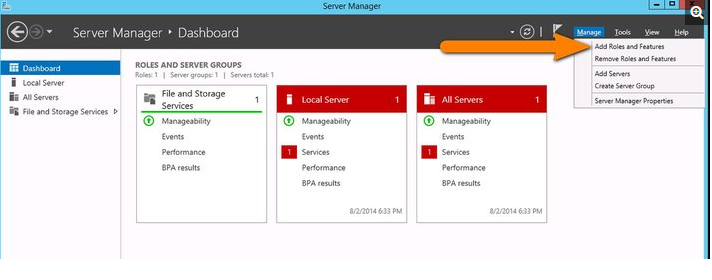
Click Next on the Features Wizard Before you begin window that pops up.
For DNS servers configuration, you will need to select the Role-based or feature-based installation.

Select the server you want to install this on which is the lcoal server that you are on.
A pop up window will come up asking if you want additional tools, this wont be neccesary for you to install unless it meets your business needs.

Click next on the features windows and final confirmation.

The DNS role will then be on the server.

Thanks for reading.
Regards,
@trev03
Replies (0)
Conversation
No replies yet
Replies will appear here as people join the conversation.