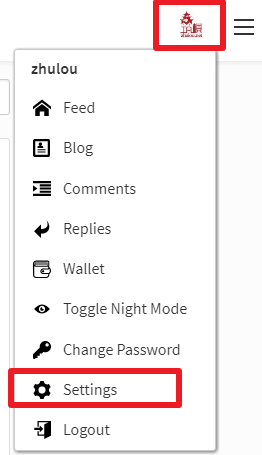
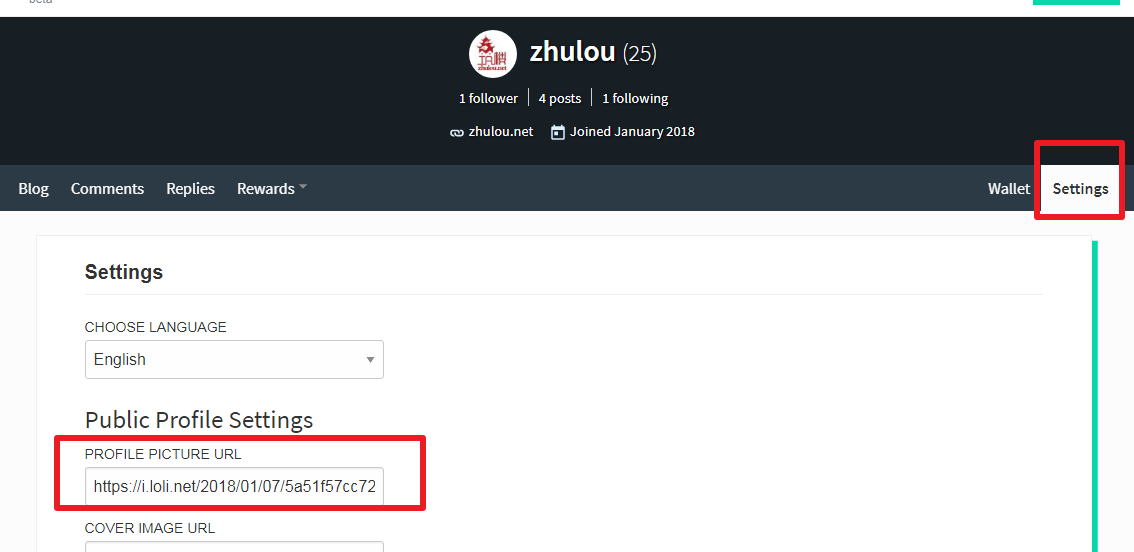
zhulou @zhulou·Jan 7, 2018, 10:38 AM UTC Community post steemit怎么设置头像? 1、点击右上角头像,弹出列表选择Settings 2、找到一个你想要设置的头像图片,进入你想上传图片的图床。如果没有可以用我用的图床https://sm.ms/ 上传后即可得到图片外链地址,复制到PROFILE PICTURE URL找个地址栏里面。然后点击Update,如果想要设置你的背景图片上传一个图片把上传的图床地址复制到COVER IMAGE URL地址栏,点击Update即可。 @justyy ↗ Share post
Glenn_Kn @glennkong·Jan 8, 2018, 12:17 AM UTC Thank you so much for your info, really appreciate the post, it helps me a lot. Keep up with the good work.
Glenn_Kn @glennkong·Jan 8, 2018, 12:18 AM UTC Btw could you follow me pls, let's make friends. Thanks

 4th Street Bar
Hive-Bar
4th Street Bar
Hive-Bar
Replies (6)
赞。初来乍到。来看看你
哈哈!谢谢,一会去你的文章点赞!
Thank you so much for your info, really appreciate the post, it helps me a lot. Keep up with the good work.
Btw could you follow me pls, let's make friends. Thanks
I'm glad to be able to help you
谢谢分享